AI agents startup automation is the practical play of connecting an LLM to tools (APIs, databases, internal services) and running it in a loop so it can plan, act, observe results, and iterate, within guardrails you control.
TL;DR
This article provides a practical AI agents startup automation playbook: automate one high-frequency routine with approvals and observability, then expand autonomy only after production reliability is proven.




- What it means: Your agent drafts, routes, retrieves, and (when allowed) executes actions through strict tool schemas.
- Who it’s for: Pre-seed founders/CTOs who are repeating the same ops tasks daily and need leverage without adding headcount.
- How to execute: Start “read-only + draft,” add human approval for side-effects, then harden with tracing + evals.
- Next step: Build your first agent workflow inside XRaise’s Web App, then extend runway with tooling credits on XRaise Startup Perks.
AI agents startup automation: what is an AI agent vs traditional automation?
Definition: An AI agent is an LLM connected to tools and run in a loop, plan → call tool → observe → continue, until it finishes or escalates.
That loop is the key. It’s why “agentic” systems can handle messy requests (“schedule this,” “find the issue,” “draft the reply”) while classic automation needs a rigid input format and a pre-written path.
Two startup-friendly categories matter:
- Workflow-style agentic systems (lower autonomy): You define the steps, the LLM fills in interpretation, extraction, drafting, and routing inside those steps. This is easier to test and safer to operate.
- Higher-autonomy agents: The model decides the plan and tool sequence dynamically. Flexible, but the risk curve rises fast without controls.
If you want a concrete “agent inside the workspace” example, XRaise’s breakdown of Notion AI Agents is a good mental model: you’re moving from “assistant that suggests” to “system that executes,” so boundaries matter.
Robotic process automation AI: RPA vs AI agents startup automation
RPA is great at deterministic UI or rule-based work. AI agents startup automation earns its keep when the inputs are unstructured (emails, chats, docs) and the job requires interpretation before execution.
Most early-stage stacks end up hybrid:
- LLM handles intent + extraction + drafting
- APIs/RPA handle the “do” part (update CRM, create ticket, trigger workflow)
AI agents startup automation: which routine tasks can agents handle?
The near-term, high-ROI routines cluster into repeatable patterns:
| Pattern | What it does |
|---|---|
| Triage/classification | Label, prioritize, route |
| Summarization | Meetings, tickets, threads |
| Template-based drafting | Replies, updates, follow-ups |
| Retrieval (RAG) | Pull answers from your own docs/KB |
| Data entry / reconciliation | Structured fields from messy inputs |
| Controlled actions | Execute only through strict tools + approvals |
AI agent use cases for startups: practical starters by routine
Inbox + ticketing (draft-first):
- Draft a reply using your KB + policy snippets
- Ask a single clarifying question when confidence is low
- Route to a human with a clean context bundle
Support is often the first place teams see measurable impact because “deflection vs escalation” is trackable. If you’re building support operations, skim Intercom for Startups for how AI-first support stacks think about scale.
Scheduling (bounded autonomy):
- Propose time windows
- Confirm timezone + attendees
- Book and send recap + agenda draft
Operator callout: Rule of thumb: if the agent can’t explain why it chose a slot (constraints + conflicts), keep scheduling in “propose-only” mode.
Data queries + weekly updates (RAG + structure):
- Answer “what changed?” from one source of truth
- Output deltas in a fixed format (metric → change → reason → next action)
For teams that need external data feeds for agent workflows, Apify’s startup guide is a grounded example of “repeatable web data → datasets → workflows.”
What are popular frameworks or platforms to build AI agents?
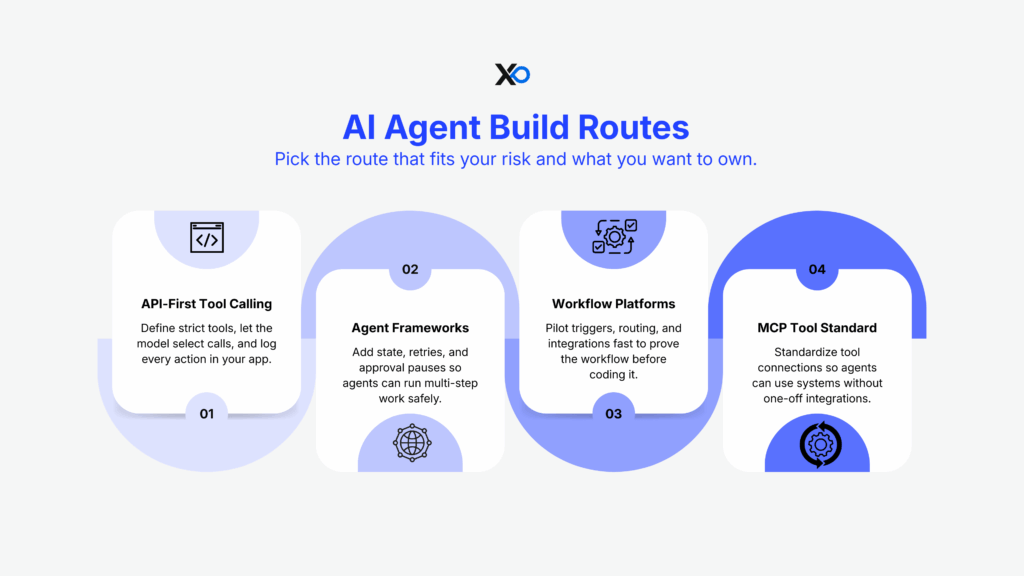
Pick a build route that matches your risk tolerance and how much you want to own.
Route 1: API-first tool calling (most common for product teams)
You define tools/functions (strict schemas), the model selects calls, your app executes and logs everything. OpenAI’s tool calling flow makes this pattern explicit: model proposes a tool call → application executes → model continues with results.
If you’re building in 2026, the Responses API framing is especially relevant because it’s designed for multi-tool, multi-step runs in a single request.
Route 2: Agent frameworks for orchestration + state
Use frameworks when you need:
- persistent state
- retries/timeouts
- human-in-the-loop pauses
- explicit graphs/state machines
LangGraph’s interrupts are a clean way to implement “approve / edit / reject” without losing state mid-run.
Route 3: Workflow platforms (fastest pilot)
If you’re still proving whether a workflow is worth owning in code, workflow tools can help you test triggers, routing, and integrations quickly. XRaise’s Make automation deep-dive is useful here because it forces you to think in triggers, branches, and failure paths, not prompts.
Route 4: Standardize tool connections with MCP
When you’re integrating many tools, MCP (Model Context Protocol) is designed to reduce bespoke integrations by standardizing how apps expose tools and context to LLM systems.
Operator callout: If your agent needs 10 integrations to be useful, you don’t need a “smarter model” first, you need a cleaner tool surface.
How to integrate AI agents startup automation into existing workflows
The rollout that works for pre-seed teams is phased by risk:
| Phase | What you do | Examples |
|---|---|---|
| Phase A (weeks) | Read-only + draft | Summaries, routing, suggested replies |
| Phase B | Add approvals for actions | Send email, update CRM, issue refund |
| Phase C | Make it reliable | Event-driven orchestration, retries, queues |
| Phase D | Optimize | Evals, monitoring, model routing, cost controls |
Two integration choices reduce chaos immediately:
1) Put the agent where context already lives.
If your operating system is a workspace, build your KB and policies there first.
2) Treat the tool layer like a contract.
Tool schemas should be small, typed, and validated server-side. The model suggests; your system decides what’s allowed.
What mistakes should startups avoid when deploying AI agents?
The failure modes are boring, and expensive.
1) Prompt injection + untrusted inputs driving actions
OWASP flags prompt injection and insecure output handling as top risks for LLM applications. The mitigation is structural: separate untrusted text, validate outputs, and restrict tool permissions.
2) Shipping without auditability
If you can’t trace what the agent did (inputs → tool calls → outputs), you can’t debug drift or prove what happened when something goes wrong.
3) Over-automation in customer support
Klarna’s public swing toward heavy AI automation and later rebalancing is a useful warning: efficiency gains don’t matter if service quality drops.
4) Cost blowups from “open-ended loops”
Agent loops can spiral if you don’t cap retries, bound tool calls, and measure cost per successful outcome.
If you can’t explain what the agent is allowed to do in one paragraph, cut the scope until you can.
How to measure ROI and reliability of AI agents startup automation
If you want AI agents startup automation to survive past demo day, measure outcomes like an operator:
The four metrics that keep you honest
- Time saved per week (baseline vs assisted)
- Completion rate (finishes without rescue)
- Escalation rate (routes correctly to a human)
- Error rate (incorrect facts, wrong tool actions, policy violations)
Then add two controls:
- Cost per successful task (not per message)
- Rollback rate (how often humans reverse agent actions)
Evals + observability aren’t “later”
LangSmith and Langfuse both emphasize tracing and evaluation workflows for LLM applications so teams can catch regressions and monitor real behavior in production.
A simple eval loop:
- collect real examples
- define pass/fail checks
- run offline evals when prompts/models change
- run online monitoring with sampling
Cost buckets you should model (before you scale)
Expect six buckets:
- model tokens
- retrieval/embeddings + storage
- tool execution compute
- platform/tool-call fees
- observability/evals
- human review time
Model pricing is published per million tokens (and changes over time), so keep your spreadsheet tied to current vendor pricing pages.
Your Action Plan:
- Assess fit: Are you at the right stage? Is your network weak enough to justify the equity cost? Be honest.
- Build your application foundation: Create a pitch deck that meets top-tier standards, whether you apply or not.
- Hedge your bets: Lock in accelerator-level perks NOW, regardless of whether you apply.
- Apply strategically: 5 targeted applications to programs with genuine thesis fit beat 20 spray-and-pray submissions every time.
Whether you’re accelerator-bound or building independently, XRaise gives you the unfair advantage, the tools, the perks, and the investor access without the equity cost.

Startup Perks AI Assistant
Have questions about credits? Let's chat instantly.
The next 60 days: ship one agent that earns its keep
The direction is clear: agents are becoming the control layer for routine work, but the teams that win will be the ones who build bounded workflows with measurable reliability, not the ones who chase autonomy first. When you instrument the loop (tools, approvals, traces), the work becomes improvable instead of mysterious. Keep AI agents startup automation tied to one real routine until the metrics prove it belongs.
Over the next 60 days, pick one workflow (support triage, scheduling, or weekly KPI updates), ship draft-first, add an approval gate for any side-effect, and run weekly evals so quality improves instead of drifting.
Learn more and start building with XRaise’s Web App, then explore programs that can help you scale faster through XRaise’s Accelerators.