CRM automation tools promise leverage: fewer manual updates, cleaner pipelines, and faster follow-ups. But for most startups, they either underdeliver or create hidden operational drag.
TL;DR
This article shows how founders should evaluate CRM automation tools based on execution, not hype.



- The best CRM automation tools don’t just automate tasks, they preserve CRM integrity and reduce cleanup work.
- Most tools fail at identity matching and write-back logic, not at data capture.
- Early-stage startups should prioritize native integrations and low setup over flexibility.
- The winning tool is the one that creates usable actions with minimal supervision.
Why most CRM automation tools fail startups
Most founders buy CRM automation tools too early, or for the wrong reasons.
They expect:
- automatic pipeline updates
- zero manual input
- perfectly structured data
What they get instead:
- duplicated contacts
- incorrect deal updates
- irrelevant activities logged
- broken trust in the CRM
The issue isn’t that automation doesn’t work. It’s that most tools automate without enough control.
A CRM is your system of record. If automation degrades it, the cost is compounding:
- sales decisions become less reliable
- reporting becomes misleading
- team adoption drops
This is why the right question is not: “What can this tool automate?”
It’s: “What does this tool automate safely?”

What CRM automation actually means (in practice)
CRM automation tools don’t operate in isolation. They sit inside a workflow.
At a minimum, automation touches:
| Layer | What it includes | Why it matters |
|---|---|---|
| Data capture | Calls, emails, forms | Source of truth – bad input = bad automation |
| Interpretation | AI extraction, tagging | Turns raw data into structured insights |
| Mapping | Contacts, deals, accounts | Ensures data connects to the right CRM records |
| Write-back | Tasks, notes, fields | Final output – what actually impacts your workflow |
Most tools perform well at the beginning of that chain. Fewer perform well at the end.
That’s where startups feel the difference.
For example:
- capturing a call is easy
- summarizing it is common
- turning it into correct CRM action is hard
That final step determines whether your CRM becomes a source of truth—or noise.
The three categories of CRM automation tools
Not all CRM automation tools are built for the same stage.
1) Lightweight automation tools (best for early startups)
These tools prioritize speed and usability.
| Category | Details |
|---|---|
| Tools | Fathom, Fireflies.ai, Otter.ai, MeetGeek, Sembly |
| Core focus | Speed, simplicity, and fast deployment |
| What they offer | Fast setup, native CRM integrations, automatic meeting capture, simple task creation |
| Strength | Immediate value with minimal configuration |
| Ideal for | Founder-led sales teams, early-stage startups, evolving CRM processes |
| When to choose | When you need quick ROI without building complex workflows |
2) Revenue intelligence platforms (for scaling teams)
| Category | Details |
|---|---|
| Tools | Gong, Chorus.ai, Clari Copilot, Avoma |
| Core focus | Deep sales insights, analytics, and structured CRM data |
| What they offer | Deal insights, pipeline analytics, coaching, structured field mapping |
| Strength | Improves sales performance and data consistency at scale |
| Ideal for | Growing teams with defined sales processes and RevOps support |
| When to choose | When you need deeper control, analytics, and structured CRM workflows |
For most pre-seed teams, they introduce more overhead than value.
3) Automation-first stacks (for control)
This is not one tool, it’s a system.
| Category | Details |
|---|---|
| Components | Meeting tools + APIs/webhooks + Make, n8n + CRM |
| Core focus | Control, flexibility, and deterministic automation |
| What they offer | Custom workflows, validation layers, event-based automation, audit logs |
| Strength | Full control over logic, cleaner CRM data, scalable systems |
| Ideal for | Ops-driven teams or startups with technical resources |
| When to choose | When you need precise control, validation, and reliable automation flow |
It’s more work upfront, but often cleaner long-term.
How to evaluate CRM automation tools (properly)
Forget feature lists. Use operator criteria.
1) Write-back quality
This is the most important layer.
Here’s what you have to determine:
| Question | Why it matters |
|---|---|
| Are tasks created correctly? | Ensures actions are clear and usable |
| Are owners assigned properly? | Guarantees accountability and execution |
| Are records matched accurately? | Prevents CRM errors and data mismatch |
If this fails, nothing else matters.
2) Identity resolution
Most automation errors come from poor matching.
The tool must correctly map:
| Input | CRM Mapping Target | Why it matters |
|---|---|---|
| Contact | Ensures the right person is identified | |
| Domain | Account | Links activity to the correct company |
| Meeting | Opportunity | Connects conversations to active deals |
If your CRM is messy, automation will amplify the mess.
3) Workflow control
You need control over what gets written.
Here’s what to do:
| Capability | What to look for | Why it matters |
|---|---|---|
| Filtering | Separate external vs internal meetings | Prevents CRM noise and irrelevant logging |
| Mapping rules | Define how data maps to CRM objects/fields | Ensures accurate and consistent data flow |
| Approval workflows | Require review before write-back | Reduces errors and improves data quality |
| Object-level control | Control writes (tasks vs notes vs fields) | Avoids overwriting important CRM data |
Without this, automation becomes spam.
4) Integration depth
Check whether the tool integrates natively with:
Native integrations usually mean:
- fewer edge-case failures
- better data consistency
- less maintenance
5) Implementation effort
This is where many founders miscalculate.
A tool that takes:
- 1 day to deploy
- vs 3 weeks to configure
…can produce more value even if it’s less flexible.
Speed matters early.
Native automation vs custom workflows
This is your core decision.
| Category | Native Automation | Custom Workflows |
|---|---|---|
| How it works | Uses built-in tool logic | You design and control the automation layer |
| Pros | Fast setup, immediate value, minimal effort | Precise control, validation, cleaner CRM data |
| Cons | Limited control, harder to customize | Higher setup cost, ongoing maintenance |
| Best for | Early-stage teams, founder-led sales | Scaling teams with defined processes |
| When to choose | When speed and simplicity matter most | When accuracy and control are critical |
What most startups should do
Start simple.
- use native automation
- add review steps
- gradually introduce control
This avoids both extremes:
- blind automation
- overengineering
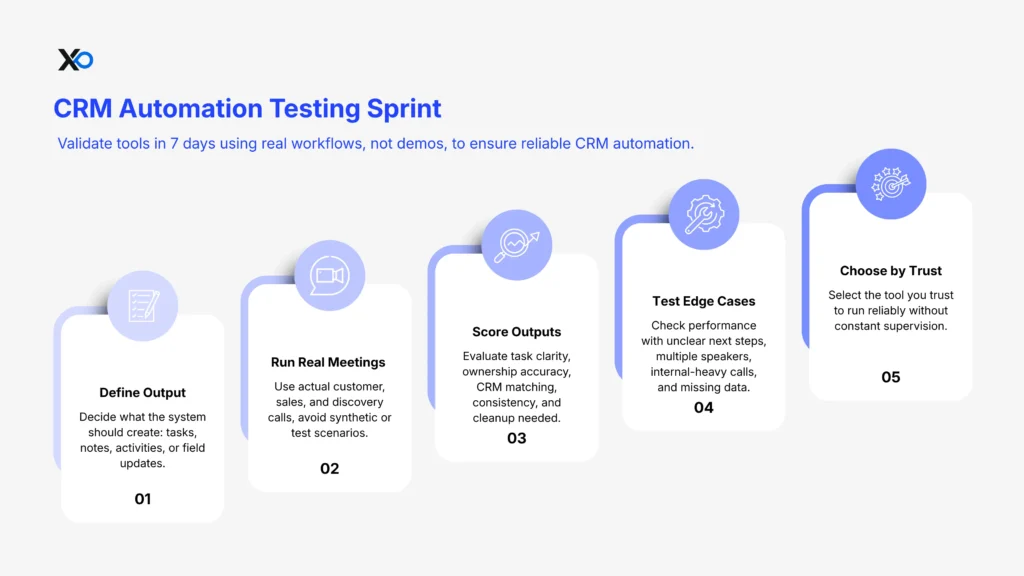
How to test CRM automation tools (in 7 days)
Don’t rely on demos. Test reality.
Step 1: Define your output
Decide what should be created:
- tasks
- notes
- activities
- field updates
Step 2: Run real meetings
Use:
- customer calls
- sales calls
- discovery sessions
Avoid synthetic tests.
Step 3: Score the outputs
Evaluate:
- clarity of tasks
- ownership accuracy
- CRM matching
- consistency
- cleanup required
Step 4: Test edge cases
See how the tool handles:
- unclear next steps
- multiple speakers
- internal-heavy calls
- missing contact data
Step 5: Choose based on trust
The best tool is not the smartest.
It’s the one you trust to run without supervision.
Common mistakes founders make
These patterns repeat across startups:
| Mistake | What it leads to |
|---|---|
| Choosing based on AI quality | Strong summaries but poor CRM execution |
| Automating too aggressively | Broken pipeline data and unreliable deal updates |
| Ignoring CRM hygiene | Incorrect matching and messy records |
| Overbuying tooling | Increased complexity and slower team execution |
| Skipping validation | Low trust in automation and higher cleanup workload |
Where CRM automation fits in your startup system
CRM automation tools are not standalone solutions.
They connect to:
- your sales workflow
- your customer conversations
- your reporting system
That’s why they should be chosen alongside your broader stack.

Startup Perks AI Assistant
Have questions about credits? Let's chat instantly.
If you’re thinking about automation more broadly, read:
- How startups use AI agents to automate routine tasks
- Startup programs strategy (2026)
- How to grow your startup faster
Your Action Plan
- Assess fit: Are you at the right stage? Is your network weak enough to justify equity?
- Build your application foundation → Use XRaise’s AI Pitch Deck Builder
- Hedge your bets → Claim $500K+ in XRaise Perks
- Apply strategically: 5 strong fits > 20 random applications
Final Thoughts
The category will improve. Models will get better. Extraction will get sharper.
But in 2026, the best CRM automation tools will not be the ones with the smartest AI. They will be the ones that preserve system integrity while reducing manual work.Within the next 7 days, test a small set of tools using real calls and choose the one that creates clean, usable CRM output with minimal oversight.
Learn more and start building with XRaise’s Web App, then explore programs that can help you scale faster through XRaise’s Accelerators.