Notion is where docs, databases, tasks, and team knowledge come together in one connected system.
A Notion AI workspace helps startups move faster by keeping decisions, execution, and context linked.
TL;DR
This guide explains the Notion AI workspace, what teams use it for, and when it’s worth consolidating your stack.
- What it is: pages + databases + built-in AI, designed to keep work and knowledge connected.
- Why it matters: fewer tools, less context switching, faster alignment, cleaner execution.
- What teams use it for: wikis, roadmaps, meeting notes, and lightweight trackers that stay linked.
- Next step: explore the startup offer on XRaise, then confirm current plan terms in Notion’s official docs.
What is a Notion AI workspace?
Notion is an AI-powered all-in-one workspace that combines documents, databases, tasks, and wikis inside one app.




Who it’s for:
- Founders and early teams that need a single source of truth
- Product, engineering, design, and ops teams working cross-functionally
What problem it solves:
- “The answer exists, but nobody can find it”
- Project status trapped in threads and scattered docs
What it often replaces:
- A separate wiki tool
- Lightweight task boards
- Ad-hoc spreadsheets used as databases
Why a Notion AI workspace matters at startup speed
A startup moves fast when everyone can see the plan, the reasoning, and the owner of the work in one place. A Notion AI workspace helps by linking decisions and notes directly to tasks and timelines, so execution stays aligned without extra meetings.
| Common startup-speed problem | What a Notion AI workspace changes |
|---|---|
| Notes and decisions are separate from tasks | Connect roadmap, spec, meeting recap, decision log, and tasks on one project page |
| Progress is unclear without a status meeting | Show owner, status, and next steps through database views (board/timeline) |
| Teams forget what was decided | Keep decisions documented and tied to the project they affect |
| Multiple tools create duplicate trackers | Use one source of truth with embedded views instead of copy/paste |
| Meetings produce notes but not actions | Use Notion AI to summarize and turn notes into action items in-context |
| Context switching slows the team | Keep docs, tasks, and updates together; connect other tools only when needed |
This is how teams keep momentum: clear ownership, visible progress, and decisions that stay attached to the work.
Where Notion fits in a modern startup stack
Notion works best as the operating layer in your startup stack: the place where plans, decisions, and execution context live in one system. The table below shows what that looks like in real setups, and which Notion plan typically fits each scenario.
Prices and features shown on Notion’s official pricing page.
| Plan | Price shown on pricing page (USD) | AI level | Best for (who) | Practical note |
|---|---|---|---|---|
| Free | $0 per member / month | Trial of Notion AI | Solo founders, personal org, very small teams testing Notion | Great to validate structure before the team depends on it. |
| Plus | $10 per member / month | Trial of Notion AI | Small teams that want real collaboration + storage + basic integrations | Good when you need team workflows, but AI isn’t core yet. |
| Business (Recommended) | $20 per member / month | Notion AI + Agents + Enterprise Search (beta) + AI Meeting Notes (beta) | Growing startups that want a true Notion AI workspace across the team | Best when you want AI to reduce writing/recap overhead and need stronger controls. |
| Enterprise | Custom pricing | Enterprise AI controls (incl. zero data retention with LLM providers) | Larger orgs / strict security & compliance needs | Choose when governance, auditability, and admin controls are the decision drivers. |
Which plan is good for who (simple founder rule)
- Use Enterprise when security/compliance and org-wide admin requirements drive the decision.
- Start on Free if you’re proving the workspace structure and rituals.
- Move to Plus when multiple people need stable collaboration and you want paid workspace features.
- Choose Business when you want AI + Agents to be a real execution lever across the team and you need stronger controls.
Notion for Startups on XRaise: the offer and how to claim it
XRaise and Notion work together so eligible startups can unlock the Notion for Startups offer on XRaise. If you’re building a Notion AI workspace as your team’s operating layer, this is the cleanest way to start on the Business plan without paying full price upfront.
What the Notion offer on XRaise includes
Eligible startups can receive up to 6 months free on the Notion Business plan with Notion AI included.
- Startups with fewer than 100 employees can redeem 6 months free when affiliated with an approved partner.
- Startups that are new Notion users without partner affiliation can receive 3 months free.
Terms apply.
What you get (Business plan access)
- Business plan features (advanced collaboration and workspace controls)
- Notion AI included at no additional cost
- Tools for docs, projects, wikis, lightweight CRM-style databases, calendars, and collaboration
- Templates for roadmaps, OKRs, onboarding, and documentation
- Permissions and automation features for scaling teams
How to apply for the offer on XRaise (practical steps)
To claim the Notion for Startups offer, you apply directly through XRaise so eligibility (under 100 employees) and the correct duration path (up to 6 months for partner-affiliated startups, or 3 months for new Notion users without affiliation) are handled in one place. To unlock the Notion perk on XRaise, follow the full application walkthrough in our apply guide on the XRaise blog.
Notes founders should not miss
- The “up to 6 months” duration depends on partner affiliation and eligibility.
- Keep seats tight early: invite only the people building the workspace until your structure is stable.
- Always confirm current terms on Notion’s official pages before finalizing procurement decisions.
Key features (the ones founders actually feel)
Founders don’t feel “features”, they feel what removes friction in planning, shipping, and staying aligned. These are the Notion capabilities that usually make the difference within the first week.
| Key feature | What it enables | Founder benefit |
|---|---|---|
| Pages + blocks | Structured docs with embeds and comments | Decisions stay reusable, not buried |
| Databases with views | One dataset shown as table/board/timeline/calendar | One source of truth, multiple operating views |
| Relations + rollups | Link projects ↔ tasks ↔ owners ↔ docs and summarize across them | Less manual status reporting |
| Templates | Repeatable PRDs, meeting notes, weekly updates, onboarding | Consistency without bureaucracy |
| Notion AI | Draft, summarize, translate, extract action items | Faster drafts and cleaner meeting output |
| Search + AI connectors | Search across Notion (and connected tools) grounded in your content | Fewer “where is that?” interruptions |
If you build around these six, Notion becomes an operating system instead of another place to store notes.
How Notion AI workspace works (explained simply)
Notion is built on pages and databases. Databases are structured lists where each row is also a page, so a “Task” isn’t just a row, it’s a page that can hold a spec, comments, and links.
The practical unlock is linking things together: projects connect to tasks; tasks connect to owners and docs; docs connect to decisions. AI sits on top to summarize, draft, and answer questions using your workspace context (and connected tools, if enabled).
A practical Notion AI workspace first-week workflow
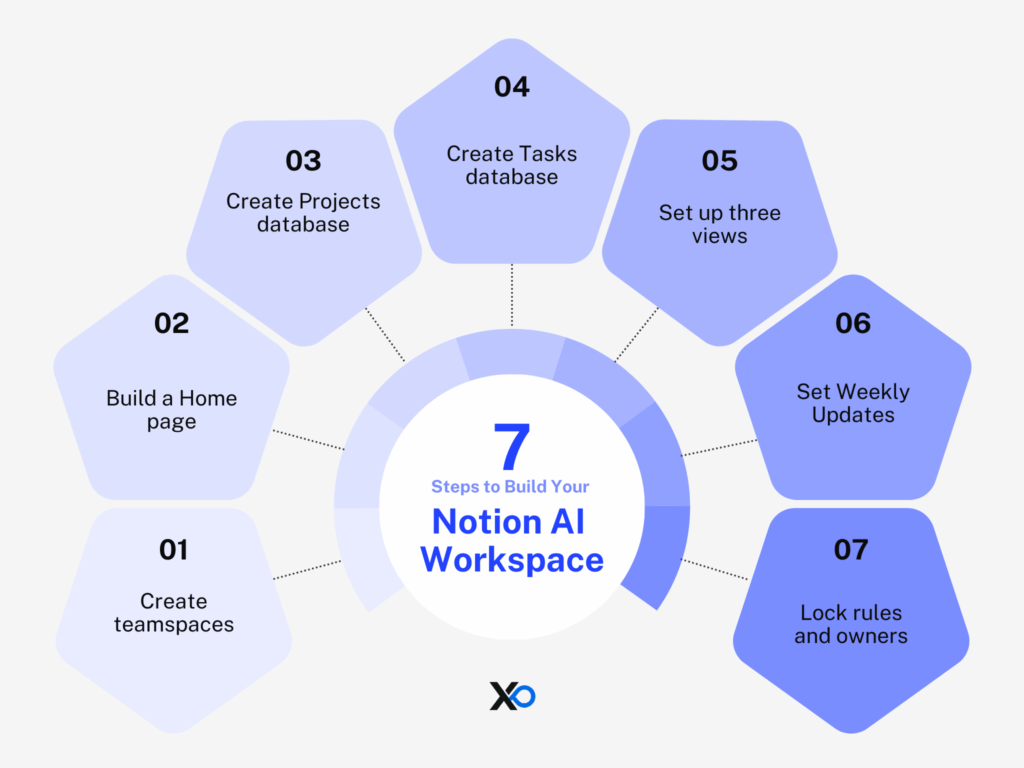
The goal: by the end of the week, your team can answer “what are we doing, why, and who owns it?” without a meeting.
- Create teamspaces and a Home page linking Roadmap, This Week, and Handbook.
- Build Projects + Tasks databases and connect them with relations.
- Add three views: By Status (board), By Week (timeline), My Tasks (personal).
- Create a Weekly Update template and make it the default.
- Publish a single “rules of the road” page, then add onboarding + SOPs.
- Enable Notion AI; connect Slack/Drive only if it reduces search friction.
- Add guardrails: owners per database and naming conventions.
Real experiences from founders and teams
Figma (Ops)
People ops and support ops teams describe using Notion as “The Figmanual,” a living knowledge base for policies and processes.
Theme: fewer repeated questions because answers have a home.
Headspace (Design)
The design team describes building a living design system in Notion so guidelines and templates are easy to find.
Theme: fewer one-off decisions because standards are documented.
Typeform (Product)
The product team highlights documenting research and product context in one place with templates that standardize inputs.
Theme: feedback becomes easier to compare and act on.
Qonto (Cross-functional)
Teams describe keeping roadmaps, Kanbans, and knowledge in one connected workspace for shared visibility.
Theme: fewer scattered updates when everyone reads from the same system.
OpenAI (Company OS)
Notion’s customer story positions Notion as the place teams organize plans, work, and knowledge to stay aligned.
Theme: context stays reachable as teams move quickly.
Cursor (Product + Engineering)
The team describes consolidating specs, notes, and planning into Notion to reduce tool juggling.
Theme: fewer open tabs, more shared context.
How Notion helps startups grow (the mechanisms)
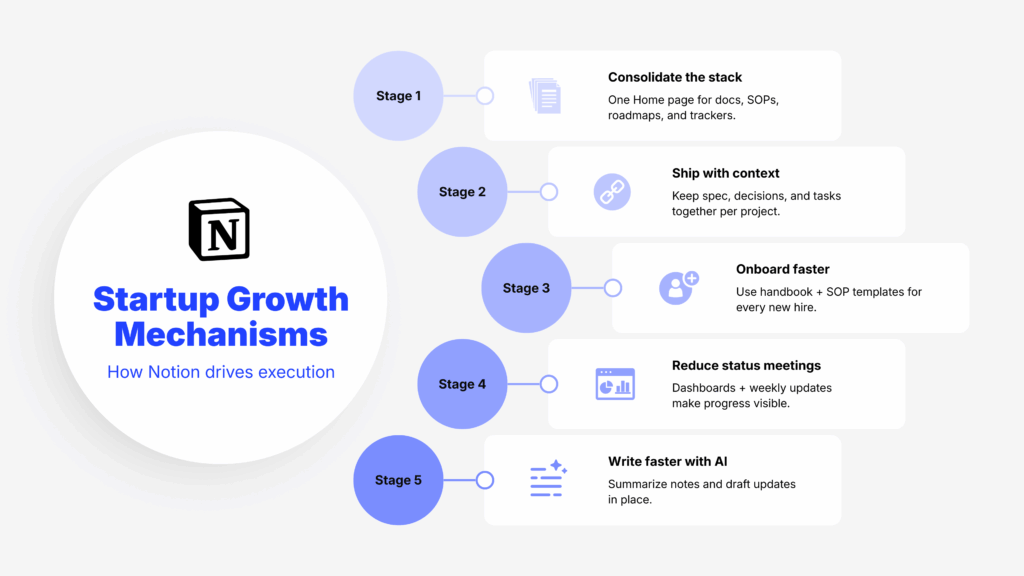
A Notion AI workspace helps startups grow by changing how work moves through the team: less tool sprawl, tighter context, and faster handoffs. These mechanisms are the practical reasons founders stick with Notion after the first week.
Consolidate the stack (runway + focus)
When you treat Notion as the “home base,” you stop maintaining the same information in five places. Put your handbook, SOPs, roadmaps, meeting notes, and lightweight trackers into one Notion AI workspace, then link them from a single Home page. The practical result is simple: fewer duplicate docs, fewer missing links, and fewer subscriptions you keep “just in case.”
Ship with better context (less rework)
Most rework happens because tasks get separated from the decisions behind them. In Notion, keep one project page that holds the spec, key decisions, and an embedded task view filtered to that project. Now, when someone opens a task, they can see the “why,” constraints, and latest changes without hunting through chat. That’s how teams stay aligned while moving quickly.
Onboard faster (knowledge retention)
Founders lose time when on-boarding depends on who is awake to answer questions. Build a handbook that includes “how we work,” SOPs, and an onboarding checklist. Make those pages templates so every new hire gets the same path. When knowledge is searchable and up to date, remote hires ramp without waiting for meetings, and teams don’t relearn the same lessons every quarter.
Reduce coordination overhead (fewer status meetings)
Status meetings happen when progress isn’t visible. Create two dashboards: “This Week” for what’s in motion and “Roadmap” for what’s next, each driven by your Tasks/Projects databases. Add a Weekly Update template so updates land in one place, consistently. The shift is that meetings become for decisions, not narration, and execution stays visible asynchronously.
Write and summarize faster (AI in-context)
In a Notion AI workspace, the best AI use is turning messy inputs into usable outputs where the work already lives. After a meeting, summarize notes into action items on the same page. Before sharing an update, draft it from the project context instead of starting from scratch. You still review everything, but you remove the blank-page tax and keep communication tight as the team scales.

Startup Perks AI Assistant
Have questions about credits? Let's chat instantly.
If you build these five habits into your workspace, Notion becomes an execution system, not just a place to store notes.
Limitations, risks, and when not to use it
- Without structure, a workspace can get messy quickly.
- Notion is not a full CRM/ERP; treat it as context + lightweight tracking.
- Database permission granularity can be limiting for “share only these rows” scenarios.
- Highly customized setups can increase switching costs later.
- AI output needs review; treat it as drafting, not truth.
- Adoption fails when “where things live” isn’t explicit.
Notion AI workspace vs alternatives (when they’re better)
If you’re deciding between Notion and other “work hubs,” start with what you need most: project-management depth or a connected docs + database system.
This quick table shows when each alternative is the better pick, and when a Notion AI workspace makes more sense.
| Alternative | Choose this when… | Choose Notion AI workspace when… |
|---|---|---|
| ClickUp | You want stronger task/project management as the core system (views, reporting, PM-first workflows). | You want docs + databases + knowledge to be the center, with tasks tightly linked to specs and decisions. |
| Asana | You want fast adoption + clean project tracking with less customization overhead. | You need a connected workspace where the “why” (docs/notes) stays attached to the “what” (execution). |
| monday.com | You want a Work OS feel with structured boards and repeatable ops workflows. | You want a single knowledge + execution layer that’s easier to turn into a company wiki + linked project system. |
| Slite | You want a clean, docs-first wiki for a sync writing and decision logging (less “build your own system”). | You want docs plus databases, dashboards, and custom workflows inside one workspace. |
| Slab | You want a wiki-first knowledge base with search and structured documentation as the main job. | You want your wiki to also power trackers, project views, and linked execution in the same place. |
FAQ
What is Notion AI workspace used for?
A single place for wikis, docs, meeting notes, roadmaps, and lightweight databases that stay linked.
Is Notion AI workspace good for startups?
Yes when you want to consolidate tools and run faster with a shared source of truth; less ideal as a primary CRM/ERP.
How fast can a small team get value?
Many small teams get real value in a week by setting up Projects/Tasks, a Home page, and a Handbook, then running weekly updates.
Does it integrate with Slack?
Yes, Notion supports Slack integration and connectors so updates and knowledge don’t stay trapped in chat.
How much does it cost?
Notion has Free/Plus/Business/Enterprise plans; Business is listed at $20 per member/month billed annually in the U.S., and pricing varies by region.
What are the main limitations?
Messiness without governance, database permission granularity constraints, and the fact it’s not a full CRM/ERP.
What’s the best alternative?
Confluence for an Atlassian-heavy org, ClickUp/Asana for advanced PM, Airtable for database-heavy ops.
Where can I confirm the terms?
Use Notion’s official pricing and startups pages for current details, and use the XRaise Notion perk page for a startup-offer summary.
Final Takeaway
Notion works best when you keep it simple: a few core databases, clear ownership, and a handbook people trust. If you want a tool that holds context (docs, decisions, notes) and still runs execution (tasks, roadmaps, updates), a Notion AI workspace is a practical default. If your world is heavy transactional CRM or strict ticketing, keep those systems as the record of truth and use Notion for the narrative and coordination layer.
To see the startup offer summarized, explore Notion for Startups on XRaise and for official docs and current terms, confirm on Notion’s site.