Last updated: June 2026
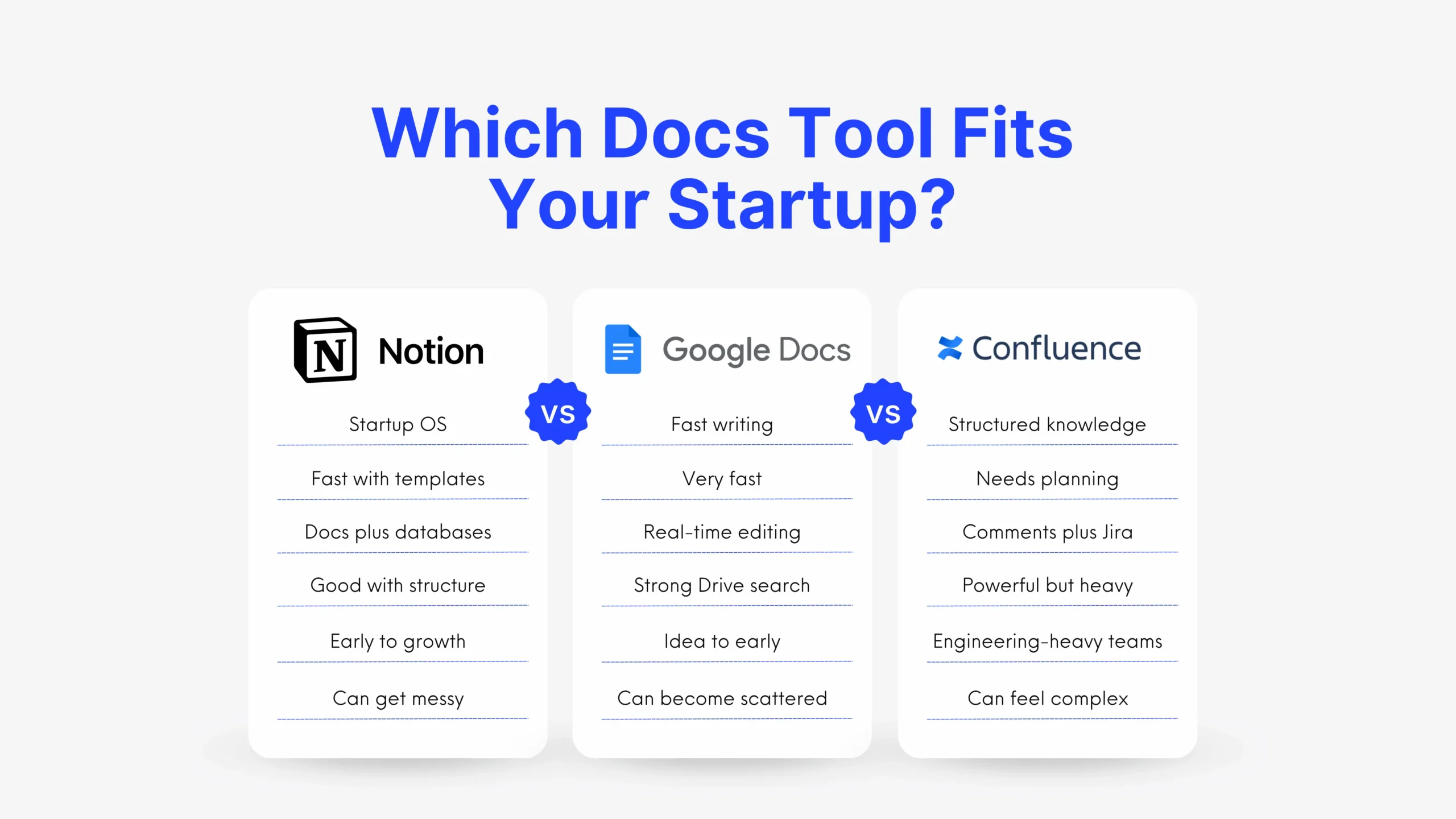
Notion vs Confluence vs Google Docs comes down to one question: do you need flexibility, structure, or simple collaboration?
For founders, the right choice affects cost, setup speed, team alignment, and how easily people find answers later.
TL;DR




This article provides a practical comparison of Notion vs Confluence vs Google Docs for startup documentation.
- Best overall: Notion, for early-stage teams that want docs, wikis, projects, and AI in one workspace.
- Best for lean teams: Google Docs, if you already use Google Workspace and need fast collaboration.
- Best for scaling teams: Confluence, especially for engineering-heavy teams using Jira.
- Biggest tradeoff: Notion can get messy, Confluence can feel heavy, and Google Docs can become scattered.
- What to do next: If Notion fits your startup, apply through XRaise first, then verify official terms with Notion.
Notion vs Confluence vs Google Docs: quick comparison table
This quick table compares Notion, Confluence, and Google Docs across the factors founders usually care about most: setup, pricing, collaboration, search, and startup fit.
Use it as a fast filter before reading the deeper breakdown below.
| Criteria | Notion | Confluence | Google Docs | Best |
|---|---|---|---|---|
| Best for | Startup OS, wiki, projects | Structured team knowledge | Fast writing and sharing | Depends on stage |
| Pricing | Free + paid plans | Free up to 10 users | Workspace-based pricing | Google for bundle, Notion for perk |
| Setup | Fast with templates | Slower, needs structure | Very fast | Google Docs |
| Collaboration | Strong docs + databases | Strong structured comments | Excellent real-time editing | Google Docs |
| Search | Good, but needs structure | Powerful, but can frustrate users | Very strong Drive search | Google Docs |
| Integrations | Slack, Jira, GitHub, Drive, more | Best with Jira and Atlassian | Best with Google Workspace | Depends on stack |
| Permissions | Stronger on paid plans | Strong space/page controls | Doc and folder-level controls | Confluence |
| Startup fit | Very strong early-stage | Strong at growth/engineering scale | Strong at earliest stage | Notion |
| Customer experience | Flexible, but can sprawl | Structured, but can feel heavy | Familiar, but can get chaotic | Depends on discipline |
| XRaise perk | Up to 6 months free | Not listed | Not listed | Notion |
How we compared Notion vs Confluence vs Google Docs
We compared each tool through a founder lens, focusing on the factors that affect speed, adoption, and long-term documentation quality.
| Factor | What we checked |
|---|---|
| Pricing | Cost now and as the team grows |
| Setup | How fast teams can create useful docs |
| Usability | Whether non-technical teammates will use it |
| Collaboration | Writing, comments, reviews, and sharing |
| Search | How easily teams can find answers later |
| Scalability | Permissions, structure, and team growth |
| Startup value | Whether it reduces chaos without adding process debt |
The goal was simple: identify which platform helps startups stay organized, move faster, and maintain a source of truth the team will actually use.
What real startup teams say about Notion, Confluence, and Google Docs
Notion vs Confluence vs Google Docs: customer experience
Customer experience shows that each tool can work well, or fail, depending on team habits and stage.
One startup team documented a move from Google Docs → Notion → Confluence → back to Notion over 18 months.
The takeaway is simple: switching tools does not fix weak documentation habits. Startups still need clear owners, naming rules, review cycles, and a simple navigation structure.
| Tool | What worked | What became difficult |
|---|---|---|
| Google Docs | Fast, familiar, easy to share | Scattered folders, duplicate files, unclear ownership |
| Notion | Better structure for docs, pages, and workflows | Duplicate pages, template bloat, harder navigation |
| Confluence | Stronger fit for engineering and Jira-connected work | Too complex for marketing and non-technical teams |
For founders, the better question is not “Which tool has more features?” It is: Which tool will our team keep clean six months from now?
Notion review for startups
Notion is the best all-around choice for many early-stage startups.
It combines documents, wikis, databases, project pages, roadmaps, meeting notes, and AI features in one workspace. That makes it useful for teams that want to reduce tool sprawl and keep context in one place.
For a small team, this can be a major advantage.
Instead of using one tool for notes, another for tasks, another for roadmaps, and another for internal knowledge, Notion can act as a lightweight company operating system.
Where Notion wins
Notion’s main advantage is flexibility. It gives startups one workspace for documentation, planning, and lightweight operations.
| Startup need | Notion use case |
|---|---|
| Company knowledge | Wiki, operating manual, meeting notes |
| Planning | Roadmaps, launch checklists, team dashboards |
| Fundraising | Investor CRM and follow-up tracking |
| Hiring | Pipelines, scorecards, and interview notes |
| Research | Customer insights and content calendars |
This makes Notion useful for fast-changing teams that need structure without adding too many tools too early.
Where Notion falls short
Notion can become messy when teams treat it like a blank canvas without clear rules.
| Risk | How to prevent it |
|---|---|
| Too many pages | Use one main homepage |
| Duplicate docs | Assign owners to key sections |
| Template bloat | Keep templates simple early |
| Weak navigation | Use clear naming and hierarchy |
| Stale content | Archive old pages regularly |
Notion works best when startups balance flexibility with ownership, cleanup, and a simple workspace structure.
Who should choose Notion
Notion is best for startups that need one flexible workspace for documentation, planning, and execution.
| Best fit | Why Notion works |
|---|---|
| Early-stage teams | Fast setup without heavy process |
| Cross-functional teams | Docs, projects, and workflows in one place |
| Remote or hybrid teams | Centralized async knowledge |
| Teams reducing tool sprawl | Replaces several lightweight tools |
| AI-focused teams | Notion AI works inside the workspace |
Choose Notion if your team wants a company wiki, project hub, and operating system in one place.
Pricing notes for Notion
Notion offers free and paid plans, but startups should first check the XRaise perk.
| Plan | Price | Best for |
|---|---|---|
| Free | $0 | Individuals testing Notion |
| Plus | $10/user/month | Small teams |
| Business | $20/user/month | Growing startups needing admin controls and AI |
| Enterprise | Custom | Larger teams with advanced security needs |
Through XRaise, eligible startups can get Notion Business free for up to 6 months with Notion AI included.

Startup Perks AI Assistant
Have questions about credits? Let's chat instantly.
Start with checking Notion for Startups offer on XRaise and then verify the latest eligibility and terms on Notion’s official pages.
Confluence review for startups
Confluence is best for startups that need structure.
It is especially useful for engineering-heavy teams, product teams, and companies already using Jira. Confluence works like a traditional internal wiki, with spaces, pages, templates, comments, permissions, and version history.
That makes it stronger than Google Docs for long-term documentation.
It also gives teams more structure than Notion, especially when the organization starts to grow.
Where Confluence wins
Confluence is strongest when documentation needs structure, governance, and technical context.
| Team need | Confluence use case |
|---|---|
| Engineering docs | Specs, decisions, and release notes |
| Product planning | Requirements and Jira-connected planning |
| Team knowledge | Handbooks, onboarding, and support docs |
| Process control | SOPs, permissions, and version history |
| Incident management | Reviews, postmortems, and action tracking |
Its biggest advantage is the Atlassian ecosystem. For teams already using Jira, Confluence keeps planning, execution, and documentation closer together.
Where Confluence falls short
Confluence can feel heavy when the setup is too complex or only engineering adopts it.
| Risk | What it creates |
|---|---|
| Complex setup | Slower adoption across teams |
| Poor page structure | Harder navigation and search |
| Technical interface | Lower usage outside engineering |
| Jira-first workflow | Less fit for marketing or sales |
| Split adoption | Knowledge spread across multiple tools |
Confluence works best when the whole company agrees on structure, ownership, and where documentation should live.
Who should choose Confluence
Confluence is best for startups that need structured documentation, technical depth, and stronger governance.
| Best fit | Why Confluence works |
|---|---|
| Engineering-heavy teams | Built for specs, decisions, and technical docs |
| Jira users | Keeps planning and documentation connected |
| Scaling teams | Adds structure beyond informal docs |
| Process-driven teams | Supports handbooks, SOPs, and repeatable workflows |
| Governance-focused teams | Offers stronger permissions and documentation control |
Choose Confluence when your startup has outgrown informal documentation and needs a more structured system for technical and operational knowledge.
Pricing notes for Confluence
Confluence has a free plan for small teams and paid plans for teams that need more structure, support, and governance.
| Plan | Price | Best for |
|---|---|---|
| Free | $0 | Small teams up to 10 users |
| Standard | $5.42/user/month | Growing teams needing permissions and more storage |
| Premium | $10.44/user/month | Scaling teams needing advanced admin, automation, and SLA |
| Enterprise | Custom | Large organizations with advanced security needs |
For startups, Confluence is usually worth the cost when the team already uses Jira or needs structured technical documentation. Otherwise, it may add too much setup and admin overhead too early.
Pricing is based on Atlassian’s Confluence Cloud pricing page and may change by billing setup or team size. Verify current pricing before purchase.
Google Docs review for startups
Google Docs is the easiest tool to adopt.
Almost every founder, teammate, contractor, investor, and advisor already knows how to use it. That makes it the lowest-friction option for writing, editing, commenting, and sharing.
For very early-stage startups, this is valuable.
There is no complex setup, training, or documentation architecture required. Teams can open a doc, start writing, and collaborate immediately.
Where Google Docs wins
Google Docs is strongest when teams need fast, familiar collaboration with almost no onboarding.
| Team need | Google Docs use case |
|---|---|
| Meetings | Notes, action items, and follow-ups |
| Fundraising | Investor updates and pitch drafts |
| Sales | Proposals and shared sales docs |
| Hiring | Scorecards and interview notes |
| Strategy | Memos, board updates, and planning docs |
| External collaboration | Work with investors, candidates, lawyers, and partners |
Its biggest advantage is simplicity. Teams can write, comment, review, share, and collaborate in real time without adding a new documentation system.
Where Google Docs falls short
Google Docs works well for drafting, but it is not built as a structured knowledge base.
| Risk | What it creates |
|---|---|
| Duplicate docs | Conflicting versions and unclear source of truth |
| Scattered folders | Harder navigation as the team grows |
| Weak ownership | Stale or unmanaged content |
| Inconsistent naming | Poor search and findability |
| Too many shared links | Access and security confusion |
Google Docs is best as a fast collaboration layer. Growing startups usually need clear Drive rules or a dedicated wiki for long-term company knowledge.
Who should choose Google Docs
Google Docs is best for startups that need fast collaboration without adding a new system.
| Best fit | Why Google Docs works |
|---|---|
| Google Workspace teams | Already fits the existing workflow |
| Early-stage startups | Almost no setup or onboarding |
| External collaboration | Easy sharing with investors, partners, and candidates |
| Draft-heavy teams | Strong for memos, updates, and proposals |
| Teams without a formal wiki | Simple enough before structure becomes critical |
Choose Google Docs as a starting point for fast writing and sharing. As the team grows, move core knowledge into a more structured wiki or workspace.
Pricing notes for Google Docs
Google Docs is available for free with a personal Google account and is also included in Google Workspace for teams.
| Plan | Price | Best for |
|---|---|---|
| Personal Google account | $0 | Individuals using Docs, Drive, Sheets, and Slides |
| Business Starter | $7/user/month | Small teams needing business email, docs, and basic storage |
| Business Standard | $14/user/month | Growing teams needing more storage and meeting features |
| Business Plus | $22/user/month | Scaling teams needing Vault and advanced controls |
| Enterprise | Custom | Larger teams needing advanced security and compliance |
For startups, the main cost is not always the subscription. It is the hidden cost of documentation disorder: duplicate docs, unclear versions, and time wasted searching for the right file.
Google Workspace pricing can vary by region, billing type, and promotion. Verify current pricing on Google’s official pricing page before purchase.
Notion vs Confluence vs Google Docs: pricing and startup value
| Factor | Notion | Confluence | Google Docs | Takeaway |
|---|---|---|---|---|
| Lowest-cost start | Free plan available | Free up to 10 users | Often included in Workspace | All can start cheaply |
| Startup perk | Up to 6 months free on XRaise | Not listed | Not listed | Notion has the strongest provided perk |
| Best value | If it replaces several tools | If Jira is already core | If Workspace is already used | Depends on current stack |
| Hidden cost | Workspace sprawl | Admin and training | Folder chaos | Process matters |
| Best stage | Early to growth | Growth to scale | Idea to early stage | Match tool to maturity |
The lowest-cost tool is not always the best long-term choice. Google Docs can be affordable and easy to start with, but it may create hidden costs if teams spend too much time searching for files, confirming versions, or managing scattered folders.
Notion often delivers strong value for early-stage startups because it can replace several lightweight tools in one workspace, especially when the XRaise startup offer applies. Confluence can justify its setup cost for engineering-heavy teams that need structure, governance, and Jira-connected documentation.
Notion vs Confluence vs Google Docs: features and workflows
Setup
Google Docs is the fastest to start.
There is almost no learning curve. Most people already know how to create, edit, comment, and share a doc.
Notion is also fast, especially with templates. It gives startups more structure than Google Docs without requiring a full enterprise setup.
Confluence takes more planning. It works best when a team defines spaces, page hierarchy, permissions, and templates before rollout.
Collaboration
Google Docs is the strongest pure co-editing tool.
It is excellent for live writing, comments, suggestions, and external collaboration.
Notion is better when documents need to connect with projects, databases, roadmaps, and team workflows.
Confluence is better when comments, decisions, specs, and Jira-linked work need to live in a structured system.
Automation
Notion supports startup workflows through databases, templates, linked views, AI, and integrations.
Confluence benefits from Atlassian automation and Jira-connected workflows.
Google Docs can use Workspace add-ons, Apps Script, and Drive workflows, but it is less workflow-native than Notion or Confluence.
For early startups, Notion usually feels more practical.
For engineering teams, Confluence can become more powerful.
Reporting
Confluence is strongest for governance, admin visibility, and structured documentation at scale.
Notion can support lightweight dashboards and project views.
Google Docs is not built for documentation reporting.
If you need to know which docs are stale, who owns pages, and how teams use knowledge, Confluence has the stronger path.
Integrations
Notion integrates well with startup tools like Slack, Jira, GitHub, Google Drive, Figma, and Zapier.
Confluence is strongest inside the Atlassian ecosystem, especially with Jira and Bitbucket.
Google Docs is strongest inside Google Workspace, including Gmail, Drive, Calendar, Meet, Sheets, and Slides.
The right choice depends on where your team already works every day.
Which tool is better for your startup stage?
| Situation | Choice | Why |
|---|---|---|
| Solo founder | Google Docs or Notion | Fast, cheap, simple |
| 2–10 person startup | Notion | Flexible workspace before process gets heavy |
| 10–30 person startup | Notion | Best balance of docs, projects, and team knowledge |
| 30–50 person startup | Notion or Confluence | Choose based on engineering complexity |
| Engineering-led startup | Confluence | Better fit with Jira and technical docs |
| Sales-led startup | Notion | Easier for playbooks, CRM notes, and workflows |
| Marketing-led startup | Notion or Google Docs | Notion for systems, Docs for drafting |
| Investor-heavy workflow | Google Docs | Easy external sharing |
| Remote-first team | Notion | Stronger async workspace |
| Compliance-heavy team | Confluence or Google Workspace | Better governance paths |
| Existing Atlassian team | Confluence | Natural extension of Jira |
| Existing Google Workspace team | Google Docs + Notion | Draft in Docs, centralize in Notion |

When should you consider alternatives?
Sometimes Notion vs Confluence vs Google Docs is not the right comparison.
Another solution may be better if your documentation has a more specific job.
| Scenario | Meaning |
|---|---|
| You need customer-facing help docs | Use a help center platform |
| You need public developer docs | Use a developer documentation tool |
| You need docs-as-code | Use Git-based documentation |
| You need legal document controls | Use document management software |
| You need support knowledge | Use a support knowledge base |
| You need AI search across all tools | Use enterprise search or AI knowledge software |
| You need public product docs | Use a website or docs platform |
| You need strict approvals | Use workflow-based document software |
Do not force one tool to do everything. For more founder software breakdowns, explore the XRaise blog.
Internal docs, public docs, support docs, and technical docs often need different systems.
FAQ about Notion vs Confluence vs Google Docs
Which is best overall for startup documentation?
Notion is best overall for many early-stage startups. It gives teams a flexible workspace for docs, wikis, projects, and shared knowledge.
Is Notion better than Confluence?
Notion is better for flexibility, speed, and cross-functional startup workflows. Confluence is better for structured documentation, Jira-connected teams, and engineering-heavy companies.
Is Confluence better than Google Docs?
Confluence is better as a long-term internal wiki. Google Docs is better for fast writing, drafting, external sharing, and real-time editing.
Is Google Docs enough for a startup?
Google Docs is enough for very early teams. It becomes harder to manage when the startup needs a structured knowledge base.
What is the biggest problem with Notion?
The biggest problem is workspace sprawl. Without owners, naming rules, and cleanup habits, Notion can become hard to navigate.
What is the biggest problem with Confluence?
The biggest problem is complexity. It can feel heavy for non-technical teams and requires more setup than Google Docs or Notion.
What is the biggest problem with Google Docs?
The biggest problem is structure. Google Docs works well for individual files, but weak folder habits can create chaos at scale.
Which tool is best for remote teams?
Notion is often best for remote startup teams because it combines docs, projects, and async context in one place.
Which tool is best for engineering teams?
Confluence is usually best for engineering-heavy teams, especially if they already use Jira.
Which tool is best for investor updates?
Google Docs is usually best for investor updates because it is easy to share and familiar to external readers.
Should startups use both Notion and Google Docs?
Yes, but with clear rules. Many startups draft in Google Docs and move final knowledge into Notion.
Does XRaise offer a perk for any of these tools?
Yes. XRaise lists a Notion for Startups offer with up to 6 months free for eligible startups.
Final thoughts on Notion vs Confluence vs Google Docs
The best choice in Notion vs Confluence vs Google Docs depends on how your startup manages knowledge today and how much structure it will need next.
Notion is the strongest fit for early-stage teams that want a flexible workspace for docs, wikis, projects, and internal operations. Confluence is better for engineering-heavy teams that already use Jira and need stronger governance. Google Docs works best for fast drafting, simple sharing, and external collaboration.
For most startups, the practical path is simple: draft in Google Docs, centralize core knowledge in Notion, and move to Confluence when technical documentation becomes too complex to manage informally.
Explore the XRaise Perk Hub to find startup offers for tools like Notion and other software your team may already use.
Related reading: using Notion as a startup workspace · apply for Notion for Startups (up to 6 months free) · Slite, a lightweight documentation alternative