TL;DR
- Browse AI for startups is a practical choice when you need no-code web scraping, public data extraction, or website monitoring without building custom scrapers first.
- The main value is speed, but credits, website limits, billing cycle, data quality, and source-site reliability still matter.
- It is best for founders, operators, growth teams, and researchers with a recurring web data workflow already in mind.
- Before you claim it, check the Browse AI startup perk through XRaise and confirm the discount, eligibility, billing cycle, plan rules, and renewal pricing.
What is Browse AI?
Browse AI is a no-code web scraping, web data extraction, and website monitoring platform built to help teams manage public web data workflows through trained robots, scheduled monitoring, structured exports, and integrations. Rather than forcing teams into unnecessary complexity, it helps them answer one practical question: “Can this website data become a useful workflow before we spend engineering time on it?”
It is best for founders, operators, growth teams, researchers, and lean revenue teams that need public web data but do not want to build custom scraping infrastructure before the workflow is proven.
You might use Browse AI to monitor competitor pricing pages, collect public lead data from directories, track marketplace listings, follow job boards, watch product pages, gather SEO inputs, or build lightweight market intelligence reports.
Related Posts




For startups, the appeal is speed. If one recurring web data workflow saves time or improves a decision, Browse AI has a clearer place in your stack. If the use case is still experimental, pair this decision with a broader look at No-code Tools for Startups so you choose the lightest path that can prove the workflow.
How does it work?
Train a robot on the website you care about
You start by choosing a public website and training a robot to extract the fields or page changes that matter. Browse AI is designed so non-technical teammates can test the workflow before asking engineering to build a custom pipeline.
Run extraction or monitoring on a schedule
Once the robot is set up, you can run it manually or monitor pages on a cadence. This is useful for competitor pages, directories, listings, job boards, product catalogs, and other sources that change over time.
Send the data into tools your team already uses
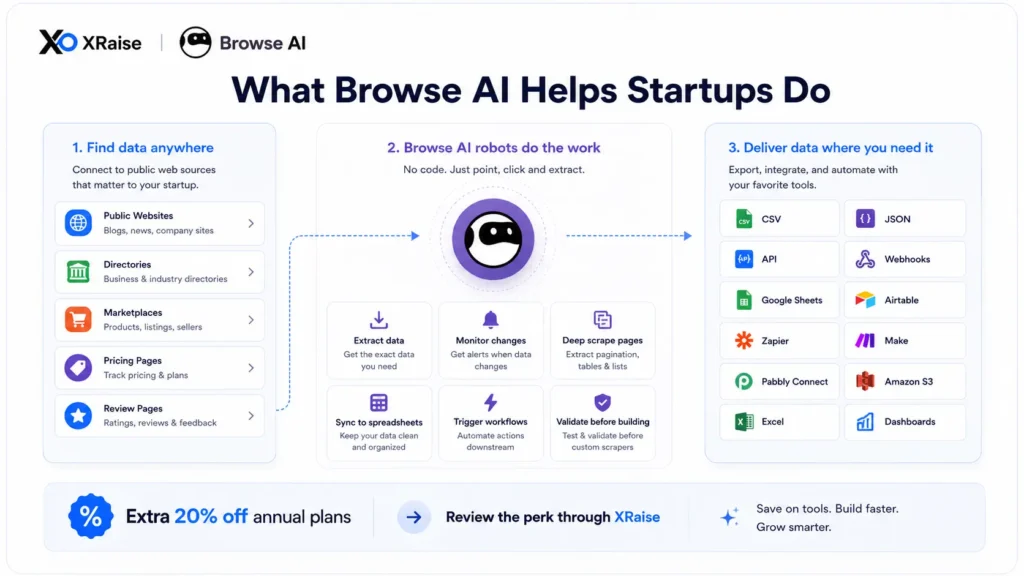
Browse AI can route data into spreadsheets, APIs, webhooks, CSV, JSON, Amazon S3, and automation tools. The workflow is strongest when the output feeds a weekly sales, research, pricing, SEO, or operations review, not just a one-time export.
Browse AI Features and Benefits
No-code web data extraction
Browse AI helps non-technical teammates collect structured data from public websites without writing scraper code.
Website monitoring
You can monitor pages for changes, which is helpful for pricing, listings, directories, product pages, and competitor updates.
Deep scraping
Browse AI supports extraction across multiple pages, linked detail pages, and repeated website patterns when one page is not enough.
Structured exports and integrations
The platform connects data to Google Sheets, Airtable, Zapier, Make, Pabbly Connect, REST API, webhooks, Amazon S3, CSV, JSON, Excel, and other workflow paths.
Startup-focused application path
Browse AI’s startup program lists an additional 20% off annual plans and asks for details such as company, funding stage, sites, row volume, scraping frequency, use case, build preference, and budget range.
Is Browse AI right for your business?
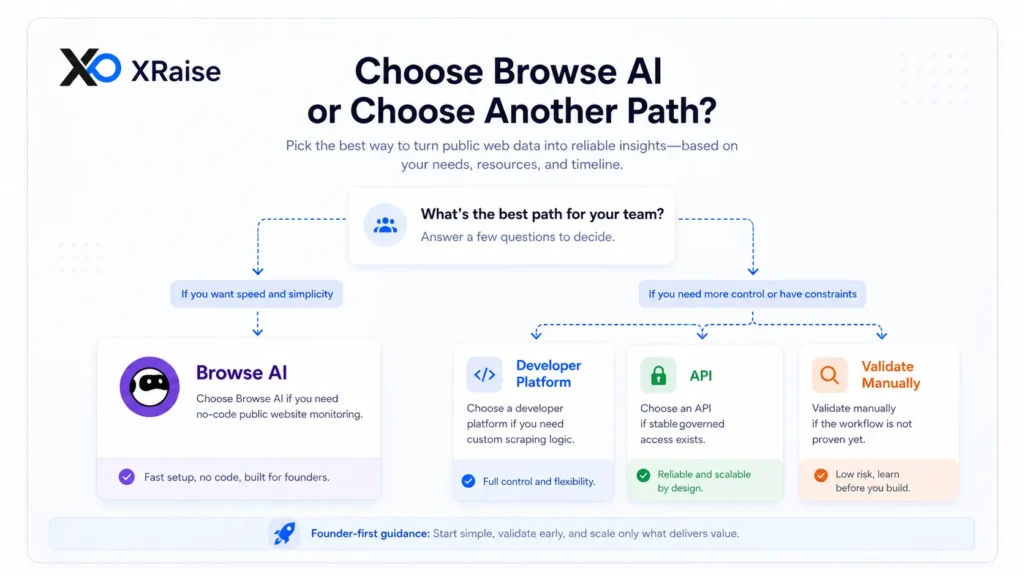
Browse AI fits your company when your priority is repeatable public web data collection, especially if your team wants faster research, cleaner monitoring, and spreadsheet or API-ready outputs without adopting heavier data infrastructure too early.
Browse AI Fit Check for Founders
| Best fit | Wait if |
|---|---|
| You have a recurring public web data workflow. | You only need a one-time export. |
| You know the source websites, fields, and review cadence. | You cannot yet define what data you need. |
| You want no-code monitoring before custom infrastructure. | An official API or licensed dataset is cleaner. |
Pros
- Easy adoption: Non-technical teammates can test web data workflows before engineering builds anything custom.
- Strong monitoring fit: Browse AI is useful for pages, listings, directories, prices, and public sources that change often.
- Useful integrations: Extracted data can move into spreadsheets, APIs, webhooks, automation tools, and storage systems.
- Practical startup discount: The startup program lists an additional 20% off annual plans for qualifying teams.
- Good validation layer: You can prove the workflow before committing to custom scraping infrastructure.
Cons
- Credits can shape cost: Rows, screenshots, premium sites, monitoring frequency, and detail pages can affect usage.
- Website changes can break workflows: Layout changes, access restrictions, captchas, and source rules still matter.
- It is not a full data platform: You may still need dashboards, CRMs, data warehouses, or review workflows.
- Complex use cases may need help: High-scale or heavily customized extraction can require managed services or engineering.
- Annual billing needs care: Review renewal pricing and whether the workflow is worth keeping before committing.
Browse AI is a good fit when the source websites, fields, cadence, and decision are clear. If your team needs governed production data at scale, compare official APIs, licensed datasets, or a custom pipeline before relying on scraping.
Pricing plans
Browse AI pricing is structured around plans, credits, websites or domains, users, integrations, support level, billing cycle, and managed-service needs. The official pricing page lists monthly and annual billing, with annual billing shown as a lower monthly equivalent and credits provided upfront.
Which Browse AI Plan Fits Your Startup?
| Plan / pricing option | How it works | Best for |
|---|---|---|
| Free | Free plan with 50 credits per month, 2 websites, 3 users, and unlimited robots. | Small tests and first robot setup. |
| Personal | $48 per month monthly, or $19 per month billed annually; annual plan lists 12,000 credits per year. | Solo founders and light recurring workflows. |
| Professional | $87 per month monthly, or $69 per month billed annually; annual plan lists 60,000+ credits per year depending on credit level. | Teams with more sites, users, and monitoring needs. |
| Premium | Starting at $500 per month billed annually, with 600,000+ credits per year and customized limits. | Managed, complex, or higher-scale extraction. |
Pricing can change, so check the official Browse AI pricing page before subscribing. Also review how credits reset, how premium sites are counted, whether unused credits carry over, and what happens if you upgrade mid-cycle.
Before you claim it, check the discount, eligibility, billing cycle, plan rules, and renewal pricing on the XRaise listing.
Save on Browse AI with the XRaise perk
Early-stage founders have to be careful with every recurring tool. If Browse AI fits a real need right now, the XRaise-listed perk can help you access an additional 20% off annual plans and test whether it saves time, improves workflow, or supports growth before you commit.
Browse AI’s startup application asks for details such as work email, company name, amount raised, number of sites, expected row volume, scraping frequency, use case, build preference, and monthly budget range.
How to use the Browse AI startup perk
- Open the offer page on XRaise.
- Review the terms, plan rules, and claim steps.
- Check eligibility, limits, billing rules, and renewal pricing.
- Start the trial or redemption process only if the tool fits a real workflow.

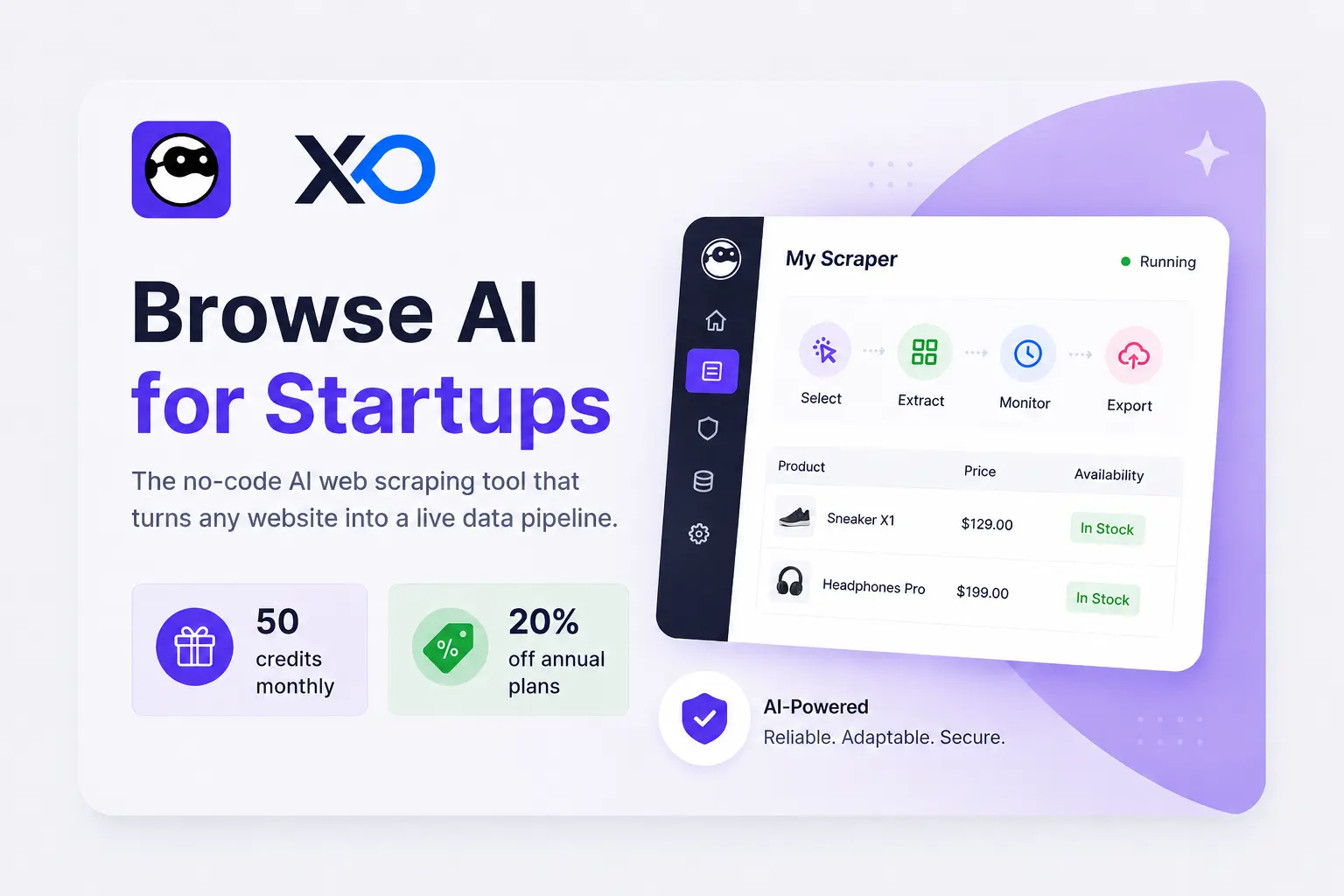
Browse AI for Startups
50 monthly credits for AI data scraping and website monitoring.
Who is it best for?
This perk is usually best for startups that already have a repeatable public web data workflow to test. Before you commit, check whether it applies to your account type, location, plan, billing cycle, and customer status.
If you’re still comparing tools, review other web data automation offers on XRaise before choosing. If you are building your wider software stack, the XRaise guides to startup perks for founders and startup tools for founders are useful next reads.
What are alternatives for Browse AI?
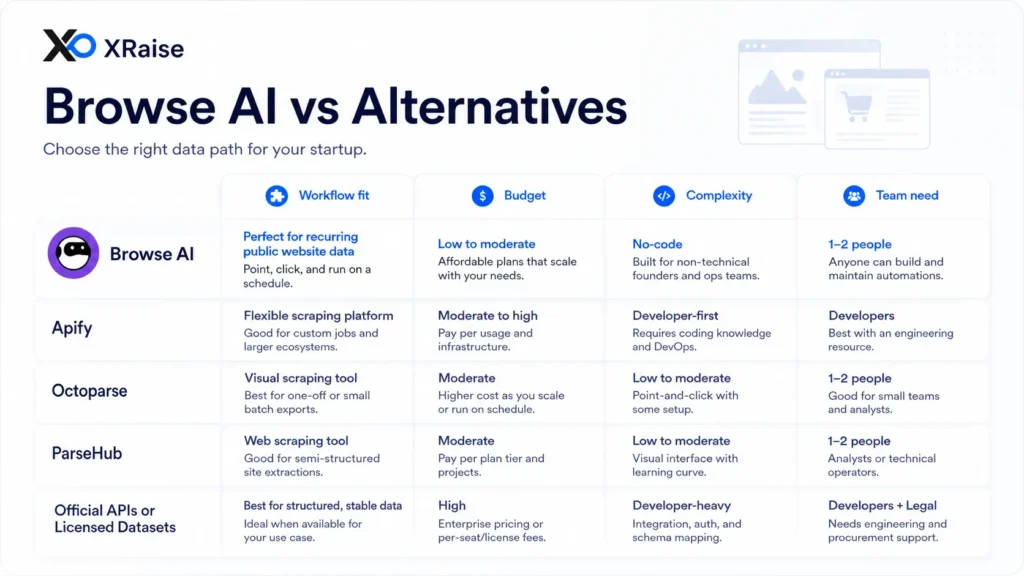
While Browse AI works well for no-code public web data extraction and monitoring, it is not the right fit for every team. Below are strong alternatives depending on workflow, budget, complexity, and team structure.
Apify
Use Apify if you need a more developer-friendly web scraping and automation platform. While Browse AI is stronger for no-code setup and operator-owned workflows, Apify may be better when your team wants more technical control, actor-based automation, and custom scraping logic.

Apify Discount for Startups
30% Scale plan discount for automated web data extraction.
Octoparse
Choose Octoparse if you want another no-code web scraping tool with a visual extraction workflow. This can be useful for teams that need point-and-click scraping, especially when they want to compare setup experience, pricing, templates, and extraction reliability.
ParseHub
Choose ParseHub if you want a visual scraping tool for more complex websites and multi-step extraction workflows. It may be a better fit when a research or operations team needs a different interface beyond Browse AI’s core robot workflow.
Zapier or Make
Choose Zapier or Make if your team prioritizes automation between apps that already expose data through integrations or APIs. These tools are often chosen when the main need is workflow routing, not extraction from public websites.

Make.com for Startups
Free Teams plan for AI-powered no-code automations.
Official APIs or licensed datasets
Choose official APIs or licensed datasets if you want reliability, compliance clarity, and cleaner production data access. This can be useful for teams that want governed data rights, higher scale, or a more stable contract than public website extraction can provide.
If your real need is heavier web data infrastructure, the XRaise guide to Bright Data for startups is a useful comparison point. Meanwhile, if your team is deciding whether to build instead of buy, read the XRaise guide to custom software development for startups before committing engineering time.
Which Web Data Option Fits Your Startup?
| Option | Best for | When to choose it |
|---|---|---|
| Browse AI | No-code public web data extraction and monitoring | You need a fast operator-owned workflow. |
| Apify or custom scripts | Technical scraping and deeper control | You have engineering support and custom logic. |
| Official APIs or licensed datasets | Stable production data access | You need governance, scale, or cleaner data rights. |
If you are actively comparing Browse AI with broader platforms, choose based on workflow fit, not brand popularity.
What customers say about Browse AI
What people generally like about Browse AI
Verified review patterns on G2 and Capterra commonly point to ease of use, no-code setup, fast robot creation, practical automation value, and helpful support. Browse AI also tends to be discussed as useful for market research, lead generation, data extraction, monitoring, and spreadsheet-connected workflows.
What people generally dislike about Browse AI
Common cautions include credit limits, pricing flexibility, setup complexity for some workflows, integration expectations, and the normal maintenance risk that comes with web scraping. Some review feedback also mentions that scraping quality can depend on the source website and that larger tests may require more credits.
Key Takeaways
- Browse AI for startups is most useful when your team has a recurring public web data workflow, not a vague one-time research task.
- Browse AI’s startup program lists an additional 20% off annual plans for qualifying startups.
- The strongest use cases include competitor monitoring, lead research, market research, SEO research, marketplace tracking, and operations monitoring.
- Before you claim it, check the discount, eligibility, billing cycle, plan rules, and renewal pricing on the XRaise listing.
- If the source has a clean official API or licensed dataset, compare that path before relying on scraping.
- XRaise helps you review the Browse AI perk alongside other startup software offers before adding another subscription.
FAQ
Is there a Browse AI promo code or startup offer available?
Browse AI’s startup program lists an additional 20% off annual plans for qualifying startups. You can review the Browse AI perk through XRaise before choosing a paid plan.
What do teams typically use Browse AI for?
Teams typically use Browse AI for public web data extraction, website monitoring, competitor tracking, lead research, market research, marketplace tracking, SEO research, pricing checks, and data routing into spreadsheets, APIs, webhooks, or automation tools.

Startup Perks AI Assistant
Have questions about credits? Let's chat instantly.
What type of web data automation tool is Browse AI?
Browse AI is a no-code web scraping, data extraction, and website monitoring tool. It is different from broader automation platforms because its core job is turning public websites into structured data workflows, not simply moving data between apps that already have integrations.
Browse AI vs Apify: what’s the practical difference?
Browse AI is usually easier for no-code teams that want to train robots and start monitoring public websites quickly. Apify may be better for technical teams that want more control, custom scraping logic, actor-based workflows, and developer-oriented infrastructure.
Is Browse AI easy to use for non-technical teams?
Browse AI is designed for no-code use, so non-technical teammates can usually start with a small extraction or monitoring workflow. The setup still needs care. Start with one public website, a few fields, one owner, and a clear review process before expanding.
What web data automation tool do startups use the most?
There is no single best web data automation tool for every startup. Teams choose based on source websites, data volume, budget, compliance needs, team skill, integration requirements, and whether the workflow is still being validated or already supports production decisions.
Should you choose Browse AI for your team?
If your priority is repeatable public web data collection, with a system your team will actually maintain, Browse AI is one of the most practical options to consider. It is especially strong for lean teams that want no-code extraction, website monitoring, and structured outputs before investing in custom data infrastructure.
If you’re on the fence, run a real two-week test with live workflows, real users, and real follow-ups. Do not judge it from a sandbox demo only. Pay attention to whether the team naturally reviews the data without being chased.
Browse AI for Startups
50 monthly credits for AI data scraping and website monitoring.
Offer details, pricing, eligibility, billing rules, and redemption steps can change. Check the XRaise listing and the Browse AI pricing page before committing. Product names, logos, and trademarks belong to their respective owners. This article should not imply a formal partnership unless verified.