AI agents for startups can reduce operational drag, but only when founders use them on the right workflows.
The goal is not “replace the team.” The goal is to remove repetitive work without creating a new mess.
TL;DR
AI agents can help startups move faster, but the best results come from narrow, measurable, human-controlled workflows.



- AI agents for startups work best in support, sales admin, scheduling, finance ops, engineering assistance, and internal knowledge work.
- Start with routine tasks that happen often, follow clear patterns, and have safe escalation paths.
- Avoid full autonomy too early. Keep humans involved before agents send messages, update records, move money, or ship code.
- A strong pilot has one workflow, one owner, one system of record, and one metric that proves whether automation is worth scaling.
What AI agents for startups actually do
AI agents for startups are not magic employees.
They are workflow systems that help teams complete repetitive tasks faster, with the right controls in place.
AI agents connect context, tools, and actions
An AI agent can read information, understand context, use approved tools, and complete a specific step in a workflow.
For example, it can read a customer ticket, search your help docs, draft a reply, classify the issue, update the helpdesk, and escalate anything risky to a human. It can also review a new inbound lead, enrich the company profile, check whether the account fits your ICP, draft a CRM note, and recommend the next step.
That is where AI agents for startups become useful.
They do not replace operators, they remove repeatable workflow drag.
| What AI agents are not | What AI agents should be |
|---|---|
| Fake employees | Controlled workflow systems |
| Magic operators | Task-specific automation layers |
| Autonomous black boxes | Human-supervised assistants |
| Random chatbots | Tools connected to real business processes |
| Decision-makers | Drafting, routing, summarizing, and execution support |
The strongest use case is not full autonomy. It is controlled workflow automation that saves time without creating chaos.
AI agents reduce repetitive founder work
Most early-stage startups do not have a people problem first.
They have a repetition problem that quietly drains founder attention.
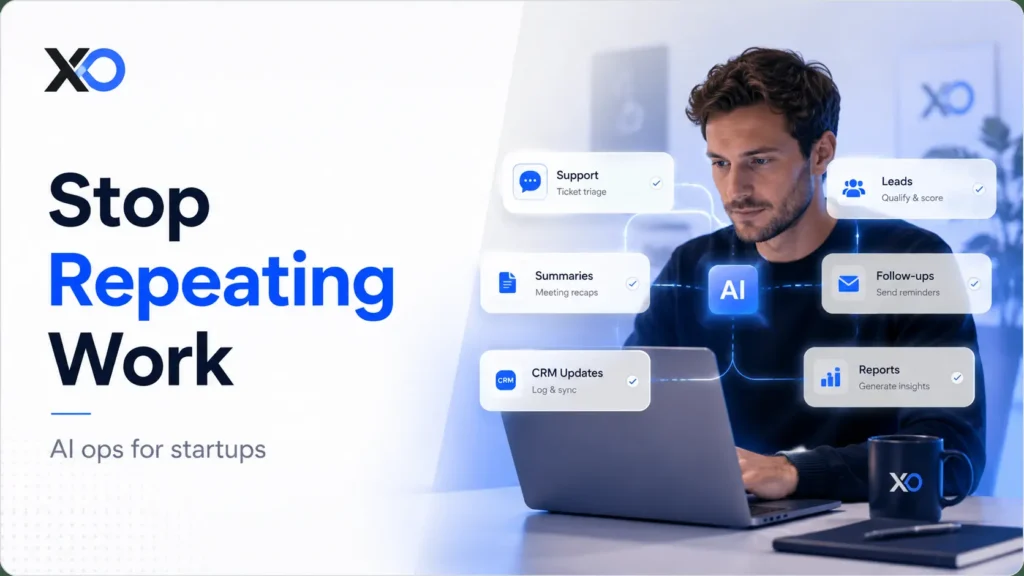
| Repetitive task | What an AI agent can help with |
|---|---|
| Repeat support questions | Draft answers from approved help docs |
| Low-quality lead qualification | Score, enrich, and summarize inbound leads |
| Meeting summaries | Turn calls into notes, decisions, and next steps |
| Follow-up chasing | Create reminders and assign action items |
| CRM updates | Fill fields, log activity, and flag missing data |
| Internal reports | Summarize weekly metrics and anomalies |
| Invoice processing | Extract details and prepare approval workflows |
| Alert sorting | Prioritize issues and route urgent cases |
| Routine content drafts | Create outlines, briefs, and first drafts |
| Buried knowledge | Find answers across docs, notes, and policies |
None of these tasks feels huge alone. Together, they steal the attention founders should spend on customers, product, and growth.
AI agents only work when the workflow is clear
AI agents are only as useful as the workflow behind them. If your process is unclear, your data is messy, or nobody owns the outcome, AI will not fix the system. It will automate confusion faster. Before using AI agents, founders need to know what work should be automated, delegated, or deleted.
For that broader operating mindset, read Startup Founder Skills 2026. Automation works better when the founder already understands where time is leaking.
Which routine startup tasks should you automate first?
The best first AI agent task has five traits:
| Strong automation signal | What it means |
|---|---|
| Happens often | The task repeats enough to justify automation |
| Digitally visible | The inputs and outputs live in tools, docs, or systems |
| Repeatable pattern | The workflow follows similar steps most of the time |
| Measurable result | You can track whether automation improves the task |
| Reviewable or reversible | Mistakes can be checked, fixed, or escalated safely |
That is why customer support, sales admin, scheduling, finance operations, engineering support, monitoring, and internal knowledge tasks are usually strong candidates.
Customer support is the easiest place to start
Support is a strong starting point when your team keeps answering the same questions.
An AI agent can draft replies from approved help docs, summarize ticket history, route complex issues, and suggest when a human should step in.
It should not handle every angry customer on day one. That creates brand risk. A safer first step is to let the agent prepare strong replies while a human approves anything sensitive.
Lead qualification removes manual research
For lead qualification, AI agents help when inbound interest is messy.
Many founders waste hours reviewing every form fill manually. An AI agent can enrich company data, summarize fit, detect obvious low-quality leads, and prepare a clean handoff for sales. It should not decide your entire sales strategy. It should reduce research time so your team can focus on real conversations.
Scheduling is a simple automation win
Scheduling is another easy win if your team loses time to back-and-forth.
An AI agent can coordinate availability, send reminders, create calendar events, update CRM activity, and trigger follow-up tasks.
This is not glamorous, but it is useful. And useful wins.
Finance operations need stricter controls
Use AI agents in finance operations when invoices, receipts, bookkeeping, or approvals keep repeating.
An AI agent can extract invoice details, suggest categories, flag duplicates, and prepare approval workflows.
But finance needs stricter control. Preparing a payment is not the same as approving one. Early agents should assist finance work, not freely move money.
Engineering agents should support review, not replace it
For engineering assistance, focus on repetitive code-adjacent work.
An AI agent can summarize issues, draft test cases, review pull request context, create migration notes, and suggest implementation paths.
It should speed up engineers, not become an unsupervised code shipper.
Internal knowledge works only when docs are current
Internal knowledge is a good fit when people constantly ask, “Where is this?”
A grounded AI agent can search docs, policies, onboarding materials, and past decisions.
But this only works if the knowledge base is current. If your docs are outdated, the agent will repeat outdated information with confidence.
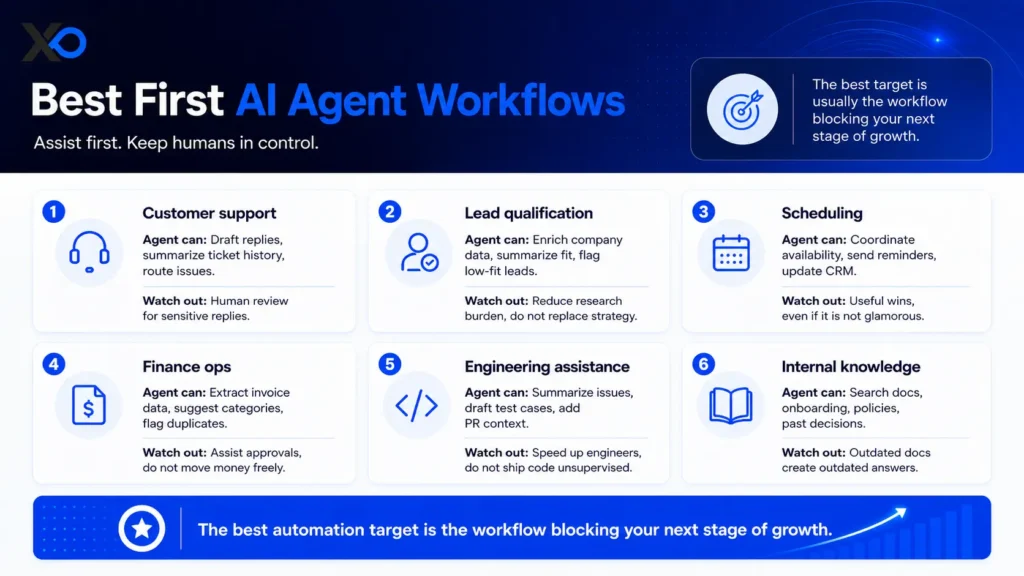
If your startup is still figuring out growth priorities, connect this with First Startup Growth. The best automation target is usually the workflow blocking your next stage of growth.
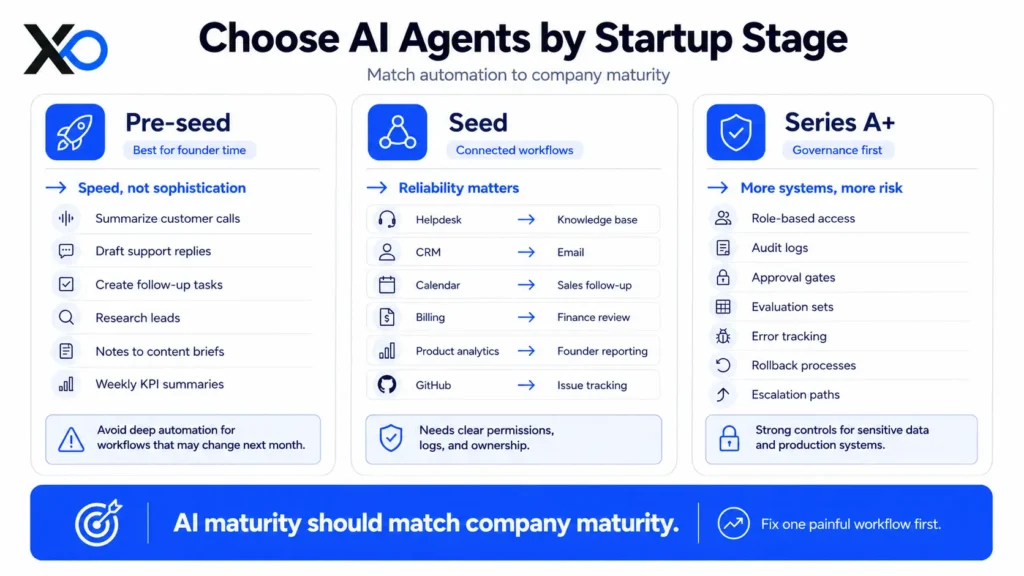
How to choose AI agents for startups by stage
Not every startup needs the same level of AI automation.
The right AI agent setup depends on your stage, workflow maturity, data quality, and risk level.
Pre-seed startups should keep AI agents simple
A pre-seed company should not build a complex agent system just because the market is excited.
At this stage, the best automation is usually lightweight, narrow, and directly tied to founder time.
For pre-seed teams, the best AI agent use cases are simple tasks that save founder time quickly.
| Pre-seed AI agent use case | What it helps with |
|---|---|
| Customer call summaries | Turns calls into notes and next steps |
| Support reply drafts | Prepares answers from approved help docs |
| Follow-up tasks | Creates reminders after calls or emails |
| Lead research | Summarizes company fit before outreach |
| Content briefs | Turns notes into outlines and drafts |
| Weekly KPI summaries | Prepares quick founder reports |
The goal is not sophistication, the goal is speed.
Seed-stage startups can connect more workflows
Seed-stage startups usually have more customers, more tools, more data, and more repeated processes.
That makes AI agents more useful, but also more risky if the workflow is not controlled.
At seed stage, AI agents become more valuable when they connect the tools your team already uses.
| System connection | What the AI agent helps automate |
|---|---|
| Helpdesk → knowledge base | Drafts support replies from approved answers |
| CRM → email | Prepares follow-ups and updates customer records |
| Calendar → sales follow-up | Turns meetings into reminders and next steps |
| Billing → finance review | Flags invoices, payments, and approval needs |
| Product analytics → founder reporting | Summarizes trends, issues, and weekly metrics |
| GitHub → issue tracking | Links code work to bugs, tasks, and product updates |
This is where AI agents shift from simple task helpers to workflow connectors.
Series A startups need stronger AI controls
Series A and later teams need stronger governance because the agent may touch more customers, more data, and more sensitive workflows.
At later stages, AI agents need stronger controls because the risk is higher.
| Control layer | Why it matters |
|---|---|
| Role-based access | Limits what each agent can see or do |
| Audit logs | Shows what happened, when, and why |
| Approval gates | Keeps risky actions human-reviewed |
| Evaluation sets | Tests the agent against real examples |
| Error tracking | Finds recurring failures before they scale |
| Rollback processes | Lets the team undo bad automation safely |
| Escalation paths | Sends unclear or risky cases to humans |
The brutal truth: AI maturity should match company maturity.
Match AI automation to your startup stage
A five-person startup does not need a multi-agent command center.
It needs one painful workflow fixed.
A scaling startup does not need another disconnected chatbot.
It needs automation that respects systems of record, security rules, and team ownership.

Startup Perks AI Assistant
Have questions about credits? Let's chat instantly.
Early teams should usually buy or use low-code tools first because they need results quickly. Scaling teams may need more control through custom integrations, orchestration, or deeper workflow logic.
The right question is not:
“What is the most powerful AI agent?”
The right question is:
“What is the safest useful agent for our current stage?”
How to compare AI agent tools before you buy
Do not compare AI agent tools by demo quality.
A clean demo does not prove the tool can handle your real startup workflow.
CRMs often have duplicates. Help docs may be outdated. Internal ownership can be unclear.
That is why founders should compare AI agent tools based on workflow fit, not model hype.
Start with workflow fit
Before buying an AI agent tool, check whether it can work inside your real operating system.
| What to ask | Why it matters |
|---|---|
| Does it integrate with your current tools? | Avoids disconnected systems and extra manual work |
| Can it read from approved sources? | Reduces guessing, hallucination, and outdated answers |
| Can it produce structured outputs? | Makes CRM, helpdesk, finance, and ops updates usable |
| Can you control allowed actions? | Prevents risky work from happening too early |
| Can humans approve sensitive steps? | Keeps refunds, payments, code, and customer issues human-led |
| Can you see what it did and why? | Gives you auditability when something goes wrong |
| Can you measure the outcome? | Proves whether the agent saves time, money, or effort |
| Can you stop or roll back the workflow? | Protects the team if the automation fails |
These questions matter more than the model name. Workflow fit decides whether the agent becomes leverage or another tool to manage.
Keep simple workflows simple
A simple tool that fits your workflow is better than a powerful tool that creates cleanup work.
For routine tasks, keep automation simple. Use clear rules, triggers, and approval steps. Add AI only where the task needs judgment, context, or interpretation.
For open-ended tasks, use bounded agents. Give the agent a clear goal, approved tools, reliable context, and stopping rules. It should know what it can do, what it cannot do, and when to escalate.
Avoid overbuilding too early
Many startups overbuild because “AI agent” sounds more exciting than “workflow.” That is the mistake.
If a task can be solved with a trigger, a few rules, and human approval, start there. You can always add more intelligence later.
The founder’s job is not to build the most complex automation system. It is to improve speed without increasing risk.
The same logic applies when comparing perks, programs, and accelerators. The best option is not always the biggest brand. It is the one that fits your stage, constraints, and next milestone. For that decision logic, read Startup Programs Strategy 2026.
Where AI agents save time without breaking trust
AI agents are safest when they help prepare the work before a human makes the final decision.
That is the difference between useful automation and risky automation.
Start with low-authority workflows
Good early workflows reduce manual effort without giving the AI agent too much authority.
| Early AI agent workflow | What it helps with |
|---|---|
| Support reply drafts | Prepares answers from approved docs |
| Customer conversation summaries | Captures key points and next steps |
| CRM notes after calls | Logs updates without manual admin |
| Missing lead fields | Flags incomplete sales records |
| Inbound lead ranking | Prioritizes leads for human review |
| Invoice detail prep | Extracts data before approval |
| Duplicate record checks | Finds repeated contacts, invoices, or accounts |
| Test case drafts | Helps engineers move faster |
| Pull request summaries | Gives reviewers cleaner context |
| Weekly analytics briefs | Turns metrics into founder updates |
| Product activity monitoring | Flags unusual usage or risk signals |
| Document action items | Turns long docs into clear next steps |
These workflows are strong first targets because they save time while keeping important decisions human-led.
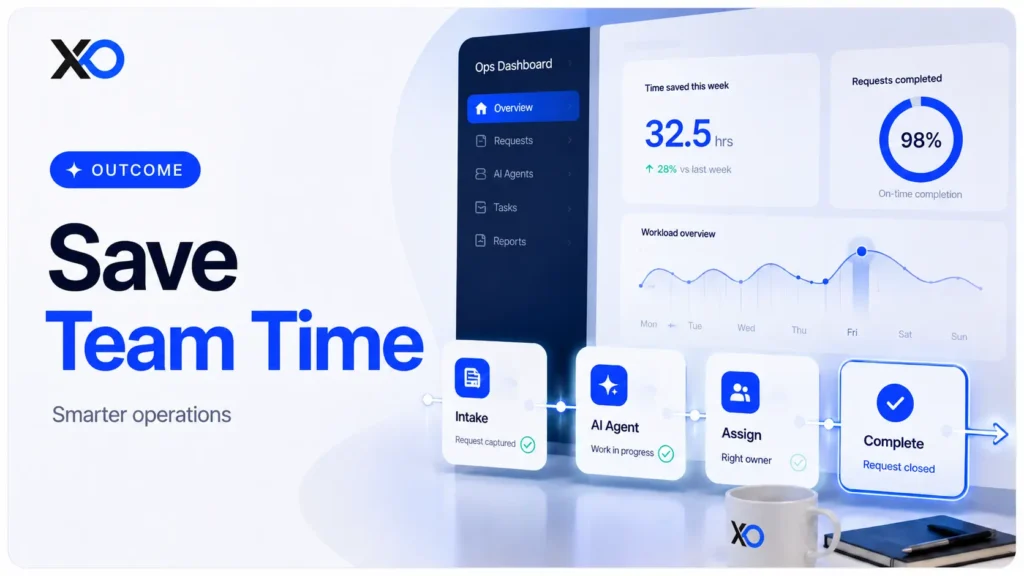
Give agents responsibility step by step
The trust boundary is simple:
Let AI agents read, summarize, classify, draft, recommend, and prepare.
Be much more careful when they send, approve, delete, refund, deploy, sign, publish, or change financial records.
That does not mean AI agents should never take action. It means they should earn more responsibility step by step.
Use a four-level rollout
A safe rollout usually has four levels:
Level 1: Read-only assistance
The agent retrieves information, summarizes context, and helps the team understand what is happening.
Level 2: Draft with approval
The agent prepares a reply, note, update, or recommendation. A human reviews it before anything goes out.
Level 3: Low-risk execution
The agent completes reversible tasks, such as tagging a ticket, creating a task, updating a non-critical field, or sending an internal reminder.
Level 4: Controlled autonomy
The agent handles a narrow workflow without approval, but only after it has proven reliable. Escalation rules still stay in place.
AI agents should get responsibility the same way a junior operator would: slowly, clearly, and with limits.
| Principle | What it means |
|---|---|
| Give useful work | Let the agent handle repeatable tasks |
| Set strict limits | Control what it can see and do |
| Keep humans close | Review sensitive actions before they happen |
| Watch performance | Track errors, quality, and time saved |
| Expand slowly | Add responsibility only after it proves reliable |
That is how startups build trust without giving AI agents too much control too early.
What should startups not automate with AI agents?
Not every workflow is a good first AI agent use case.
The worst starting points are usually high-stakes, sensitive, hard to reverse, or based on unclear judgment.
Avoid high-stakes decisions first
Bad first use cases are workflows where one wrong action can create legal, financial, customer, or team risk.
| Bad first use case | Safer AI role |
|---|---|
| Final hiring decisions | Summarize interviews, notes, and scorecards |
| Legal judgment | Organize documents and flag questions for counsel |
| Investor communication | Draft updates for founder review |
| Major customer escalations | Summarize the issue and suggest response options |
| Financial approvals | Extract invoice details and flag unusual items |
| Production deployments | Summarize release notes and deployment steps |
| Security incident decisions | Gather context and prioritize alerts |
| Contract negotiation | Summarize terms and flag risky clauses |
| Sensitive HR matters | Prepare notes and policy references |
| Strategic pricing decisions | Analyze inputs and draft pricing scenarios |
AI can summarize, prepare, classify, and draft.
But in these workflows, the final decision should stay human-led.
Do not automate bad data
Bad data creates bad automation.
An outdated help center makes a support agent repeat outdated answers.
A messy CRM leads to messy sales recommendations.
Inconsistent finance categories teach a bookkeeping agent the wrong patterns.
An ownerless knowledge base turns the agent into a confidence machine attached to stale information.
Before automating, make sure the workflow has the basic controls in place.
| What you need | Why it matters |
|---|---|
| One approved knowledge source | Keeps the agent from pulling conflicting answers |
| One workflow owner | Makes someone responsible for results and fixes |
| One system of record | Prevents duplicate or messy updates |
| Clear escalation rules | Shows when the agent should hand off to a human |
| Good outcome examples | Teaches the agent what success looks like |
| Bad outcome examples | Helps catch mistakes before they scale |
| Review and improvement process | Keeps outputs accurate as the workflow changes |
These basics make AI automation safer, easier to measure, and easier to improve.
Fix the workflow before blaming the model
The fastest way to lose trust in AI automation is to launch it on a messy workflow and then blame the model.
Most AI automation failures do not start with the model.
They start with weak workflow design.
| Failure point | What went wrong |
|---|---|
| Poor task scope | The workflow was too broad or unclear |
| Weak source data | The agent learned from messy or outdated inputs |
| Missing approval rule | Risky actions had no human checkpoint |
| No success metric | The team could not prove improvement |
| No clear owner | Nobody was responsible for results or fixes |
Better systems make better AI possible. If your startup wants cleaner operating habits before adding automation, read Business to Startup Playbook.
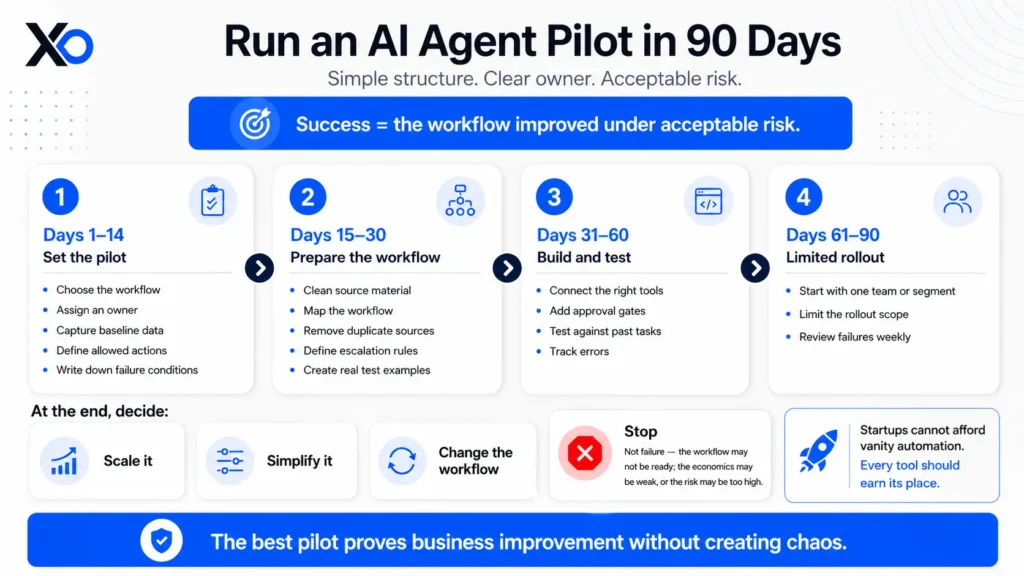
How to measure an AI agent pilot in 90 days
A useful AI agent pilot should prove one thing:
The workflow improved under acceptable risk.
That is the metric that matters. Not whether the demo looked good, the model sounded smart, or the team liked using AI.
Start with one business metric
Before the pilot begins, choose the main metric that proves whether the agent is useful.
Choose metrics based on the workflow you are testing.
| Workflow | Metrics to track |
|---|---|
| Support | Resolution rate, average handling time, CSAT, wrong-answer rate, inbox load, escalation quality, human review time |
| Sales | Accepted leads, meetings booked, research time saved, CRM completion rate, rep acceptance rate, lead response speed |
| Scheduling | Booking rate, no-shows, manual touches removed, follow-up completion, time from request to meeting |
| Finance operations | Invoice cycle time, duplicate detection, exception rate, approval speed, categorization accuracy, human correction rate |
| Engineering | PR cycle time, review burden, test coverage, issue resolution speed, escaped defects, developer acceptance |
| Internal knowledge | Repeated questions reduced, answer helpfulness, search time saved, escalation rate, outdated-answer rate |
The key is to capture the baseline before the pilot starts. Without that, you cannot prove whether the agent helped. You only have opinions.
Use a simple 90-day pilot structure
A strong pilot does not need to be complicated. It needs a clear workflow, clear ownership, and clear limits.
- Days 1–14: choose the workflow, assign an owner, capture baseline data, define allowed actions, and write down what failure looks like.
- Days 15–30: clean the source material, map the workflow, remove duplicate sources, define escalation rules, and create real test examples.
- Days 31–60: build the pilot, connect the right tools, add approval gates, test against past tasks, and track errors.
- Days 61–90: run a limited rollout with one team, segment, or workflow path. Review failures weekly.
Decide whether to scale, simplify, or stop
At the end, make a clear decision.
Scale it.
Simplify it.
Change the workflow.
Or stop.
Stopping is not failure. It means the workflow was not ready, the economics were weak, or the risk was too high.
Startups cannot afford vanity automation. The best AI agent pilot is not the one with the most autonomy. It is the one that proves real business improvement without creating new chaos.
Why AI agents for startups will become a founder advantage
AI agents for startups will not create an advantage because they sound advanced.
They create an advantage when they make the company faster, cleaner, and easier to operate.
The next wave of startup automation is not about replacing every human task. It is about redesigning workflows so teams spend less time on repetitive admin and more time on customers, product, judgment, and growth.
That is the real founder opportunity.
AI does not need to do everything.
It needs to remove the routine drag that slows everything else.
The strongest startups will use AI agents to improve the repeatable work that quietly slows the team down.
| Weekly workflow | What AI agents improve |
|---|---|
| Support | Faster answers and cleaner escalation |
| Sales | Better follow-ups and cleaner handoffs |
| Finance | Earlier issue detection and fewer missed details |
| Engineering | Clearer PR context and faster reviews |
| Internal knowledge | Easier access to docs, policies, and decisions |
| Reporting | Founder-ready updates before someone has to ask |
That is how AI agents move from “nice tool” to real operational leverage.
Start small. Pick one painful routine task. Measure the baseline. Add a controlled agent. Keep humans involved where judgment matters. Then scale what proves itself.
Learn more and start building with XRaise’s Web App, then explore programs that can help you scale faster through XRaise’s Accelerators.