TL;DR
- Choose AI by workflow, not hype.
- Use the Build Faster Filter: bottleneck, output, proof, owner.
- Start with research, product, code, sales, support, and operations.
- Avoid overlapping subscriptions that create more coordination work.
- Use XRaise to compare relevant startup AI tools and perks before paying full price.
The Problem: Founders Are Drowning in AI Options
Early-stage founders are surrounded by AI software, but most of those tools are sold as capability, not clarity.
One product promises faster writing. Another promises AI agents. Another promises automatic sales outreach, better product specs, instant landing pages, meeting notes, support answers, code generation, research summaries, design mockups, or no-code automations. Each sounds useful in isolation.
But startups do not lose speed because they lack options. They lose speed because the team has unclear workflows.




A solo founder can spend a week testing AI writing tools without publishing better pages. A technical founder can add three coding assistants without improving the release cadence. A SaaS team can buy AI sales tools before knowing its ICP. A product-led team can summarize every customer call but never turn the summaries into roadmap decisions.
This is why the AI stack conversation needs to start with work, not software.
The question is not:
“Which AI tool is best?”
The better question is:
“Where is the startup currently too slow, and what output would make us faster?”
That shift changes everything.
The Build Faster Filter
Use this four-part filter before adding any AI tool to your startup tool stack:
- Bottleneck
- Output
- Proof
- Owner
If a tool cannot pass all four, it is probably noise.
1. Bottleneck
Name the slow part of the workflow first.
Are you too slow at customer research? Product specs? Shipping code? Creating landing pages? Writing outbound? Qualifying leads? Answering support tickets? Summarizing meetings? Tracking operations?

Startup Perks AI Assistant
Have questions about credits? Let's chat instantly.
AI tools for startups work best when they are attached to a real constraint. If the bottleneck is unclear, the tool will create activity instead of speed.
2. Output
Define the artifact the tool should create.
Useful outputs include a product brief, customer insight summary, prototype, code diff, landing page draft, sales sequence, support macro, account research brief, onboarding checklist, workflow automation, or investor update.
Avoid tools that only create “assistance” without a concrete output. Founders need shipped work, not a prettier backlog.
3. Proof
Decide how the tool will prove it helped.
Look for evidence, not activity. Shipping speed should improve. Research should get cleaner. Activation should move in the right direction. Founder content should become more useful. Sales replies should improve. Support time should drop. The team should be able to make decisions faster.
The best AI tools for founders create evidence that the workflow is better.
4. Owner
Assign one person to own the tool.
Even in a two-person startup, every tool needs an owner. Someone should decide how it is used, when it gets renewed, what data it touches, and whether it actually improves the workflow.
AI sprawl usually starts when nobody owns the stack.
The Founder Workflow Lens: Choose Startup AI Tools by Job
The easiest way to avoid tool chaos is to group startup AI tools by founder workflow.
In this guide, AI tools for founders means software that helps a small team think, build, sell, support, or operate faster with clear proof.
For most early teams, the useful categories are:
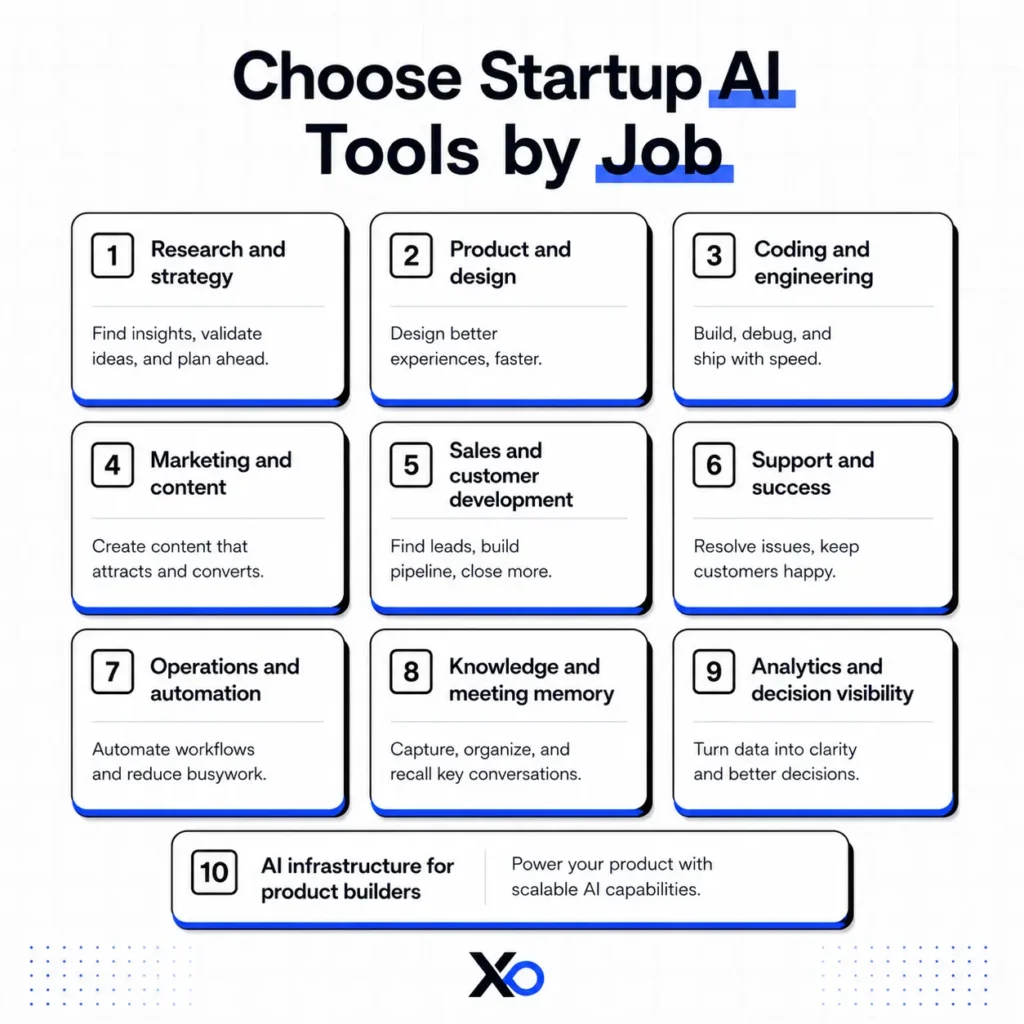
You do not need one tool from every category on day one. You need coverage where speed matters right now.
AI Research Tools
ChatGPT
ChatGPT is useful as a general founder thinking partner for research summaries, market memos, customer interview synthesis, positioning drafts, and quick strategy exploration. Use it when the bottleneck is turning scattered information into a clearer first draft or decision memo.
Claude
Claude is useful for long-form reasoning, document review, customer call synthesis, product specs, and careful rewrite work. It can help founders compress messy notes into structured insight, especially when the input is long or nuanced.
Perplexity
Perplexity is useful when founders need fast research with sources, competitive context, market scanning, or a starting point for due diligence. Use it to form better questions before customer calls, not as a substitute for primary customer learning.
AI Coding Tools
Cursor
Cursor is useful for technical founders who want AI help inside the code editor. It can speed up implementation, refactoring, debugging, and codebase navigation when the product question is already clear.
GitHub Copilot
GitHub Copilot is useful for teams already working in GitHub-centered engineering workflows. It can help with code suggestions, tests, repetitive implementation tasks, and developer productivity without forcing a separate build environment.
Claude Code
Claude Code is useful when founders want an agentic coding workflow that can reason through code changes, explain implementation paths, and help move tasks across a repository. Use it with review discipline, tests, and clear product requirements.
OpenAI Codex
OpenAI Codex is useful for founders who want coding help that can understand tasks, generate implementation plans, and work through code changes. It should compress engineering execution, not replace product judgment or security review.
AI Marketing Tools
ChatGPT
ChatGPT is useful for founder-led content, landing page drafts, positioning variants, ad concepts, email sequences, and turning customer insights into messaging. Use it to speed up a clear point of view, not to create generic volume.
Jasper
Jasper is useful when a startup has repeatable content needs and wants a more structured AI marketing workflow. It fits better after the founder knows the audience, offer, tone, and recurring campaign formats.
Canva
Canva is useful for fast visual assets, social graphics, pitch visuals, simple product explainers, and founder content production. It helps small teams create acceptable marketing collateral without slowing down on design requests.
Gamma
Gamma is useful for AI-assisted decks, narrative pages, and visual storytelling. Founders can use it for investor updates, sales explainers, internal strategy documents, and quick campaign concepts. Also, Gamma gives startups 400 free credits to create AI-powered presentations, websites, and visual content faster.
Figma AI
Figma AI is useful when product and marketing teams need faster design exploration, UI iteration, and visual ideation inside an existing design workflow. It is strongest when paired with a real product brief.
AI Sales Tools
HubSpot
HubSpot is useful when a founder needs CRM structure, lead tracking, follow-up discipline, and a shared source of truth for early sales. It helps once sales conversations are frequent enough that memory and spreadsheets start to break.

HubSpot for Startups
Up to 90% discount on an AI-powered customer platform.
Apollo
Apollo is useful for prospecting, account research, lead lists, and outbound workflows. It becomes more valuable after the founder has a clear ICP, message, and qualification rule.
Close
Close is useful for founder-led sales teams that need calling, email, pipeline tracking, and follow-up in one sales workflow. It is a good fit when the founder is actively selling and needs speed without a heavy enterprise CRM. Close gives eligible startups up to 60% off its CRM to manage sales calls, emails, follow-ups, and pipeline workflows in one place.
Instantly
Instantly is useful for cold email testing and outbound campaign operations. Founders should use it only after they understand the segment and message they are testing, because automation can scale weak targeting quickly.
Spiky.ai
Spiky.ai is useful for sales call intelligence, conversation review, and coaching signals. It can help founders understand what happens in calls, which objections appear, and where follow-up should improve.

Spiky.ai for Startups
Up to $1,000 credits on AI intelligence for sales calls.
AI Support Tools
Intercom
Intercom is useful when a startup needs in-app chat, AI-assisted support, help center workflows, and customer communication in one place. It fits best after support questions repeat often enough to justify systemizing answers. Intercom gives eligible startups free first-year access, including 300 monthly Fin AI resolutions for AI-first customer support.
Zendesk
Zendesk is useful for teams that need ticketing, support operations, routing, and more formal customer service workflows. It is better for support volume than for the earliest stage of founder-led customer learning.

Zendesk for Startups
6 months free for startups on a customer support and CRM platform.
Help Scout
Help Scout is useful for lean teams that want a simpler support inbox, knowledge base, and customer support workflow. It can help founders respond consistently without building an overly complex support operation too early. Help Scout lets eligible startups start for free with a customer support platform for shared inbox, live chat, knowledge base, and AI-assisted replies.
DevRev
DevRev is useful when support, product feedback, and engineering work need to stay connected. It can help product-led teams turn customer issues into product signals instead of losing them inside disconnected tickets. DevRev gives eligible startups up to 12 months free with up to $10,000 in credits for AI agents across product and customer operations.
AI Automation Tools
Make
Make is useful for no-code automations across sales, support, operations, and reporting workflows. Founders should use it after the manual workflow repeats and the steps are stable enough to automate.

Make.com for Startups
Free Teams plan for AI-powered no-code automations.
Zapier
Zapier is useful for connecting common SaaS tools and removing repetitive handoffs. It is often a practical first automation layer for lead routing, CRM updates, notifications, and internal ops.
Lindy
Lindy is useful for AI assistant-style workflows such as scheduling, inbox support, research tasks, and operational follow-through. It fits founders who need leverage across repeated admin work. Lindy gives startups 7 days free to test an AI work assistant for inbox, meeting, calendar, and workflow automation.
Notion
Notion is useful as an AI workspace for founder notes, docs, product specs, research, team knowledge, and operating cadence. It becomes more valuable when the team agrees where decisions and context should live.
Notion for Startups
Up to 6 months free on an AI workspace for growing teams.
BILL
BILL is useful for finance operations, payments, invoicing, and back-office workflows. It can reduce operational drag for founders who are spending too much time on financial admin. BILL gives startups free platform access to streamline invoicing, payments, expenses, and AI-powered financial operations.
AI Analytics Tools
Mixpanel
Mixpanel is useful for product analytics, activation tracking, retention analysis, and understanding what users actually do inside the product. It helps product-led founders see whether faster shipping improves behavior.

Mixpanel for Startups
$50,000 in credits for product analytics for growth.
Amplitude
Amplitude is useful for deeper product analytics, experimentation, and growth analysis. It fits teams that need stronger visibility into user journeys, conversion paths, and product-led growth decisions. Amplitude lets startups start for free with up to 10K MTUs and 10M events to analyze user behavior and product growth.
DevRev
DevRev is useful when customer support, feedback, product work, and engineering context need to connect. It can help teams see whether customer issues are isolated tickets or product roadmap signals.
WhatConverts
WhatConverts is useful for attribution, lead tracking, and understanding which marketing channels create real opportunities. It helps founders avoid confusing traffic with qualified demand. Also, WhatConverts gives startups a 14-day free trial to track leads, calls, forms, chats, and marketing attribution in one platform.
AI Infrastructure Tools
OpenAI credits through Microsoft Founders Hub
OpenAI-related credits through Microsoft Founders Hub can help AI startup founders reduce the cost of model experimentation. Use credits for necessary product tests, not as permission to overbuild before the use case is proven.

OpenAI for Startups
$5,000 Azure credits for AI models on Azure.
Google Cloud
Google Cloud is useful for startups building with cloud infrastructure, data, AI, and application hosting needs. Founders should evaluate workload fit, team familiarity, and post-credit costs before building around it. Google Cloud gives eligible startups up to $200,000 in credits for cloud hosting, AI capabilities, databases, and developer tools.
AWS
AWS is useful for startups that need broad infrastructure coverage, AI workloads, hosting, storage, data services, and scaling options. It can be powerful, but founders should avoid letting credits decide architecture by default.
Lambda
Lambda is useful for AI development cloud needs, especially when GPU access and AI compute matter to the product. AI founders should model real usage costs before making it central to the product stack. Lambda gives eligible startups up to $7,500 in cloud credits for GPU compute, model training, fine-tuning, and AI inference workloads.
Deepgram
Deepgram is useful for voice, speech-to-text, audio intelligence, and voice AI product workflows. It fits startups where audio is part of the customer experience or product infrastructure.
ElevenLabs
ElevenLabs is useful for AI voice generation, narration, audio products, and voice interface experiments. It should be evaluated by quality, latency, rights, cost, and whether voice is core to the product. ElevenLabs gives eligible startups 12 months of access with 33M characters for AI voice generation, speech, dubbing, and audio product workflows.
How to Choose AI Tools for Startups by Stage
Solo founders
Start with one general reasoning tool, one product or coding tool, one workspace, and one distribution workflow.
A simple stack might include a reasoning assistant for research and writing, an AI coding or app-building tool, Notion or a similar workspace, and one marketing or sales workflow. Keep the stack small enough that you actually use it every day. If an AI app-building workflow is part of the next milestone, see XRaise’s Emergent free plan for a focused option; verify the live allowance and deployment terms before relying on it.
Bootstrapped founders
Prioritize tools that replace paid labor, reduce repetitive manual work, or speed up revenue learning.
Be careful with overlapping subscriptions. A cheap tool can still be expensive if it creates switching cost, duplicate data, or recurring decision fatigue.
Pre-seed teams
Use AI to create proof faster: prototypes, landing pages, user research synthesis, sales learning, onboarding improvements, and support insight.
At this stage, tools should help prove customer pain and product direction. Avoid building a mature operating stack before the workflow has earned it.
Seed-stage SaaS teams
Now the job shifts from speed alone to repeatability.
Invest in AI tools that make team workflows more consistent: CRM discipline, product analytics, support systems, documentation, onboarding, reporting, and engineering quality.
The question becomes: which AI tools for startups turn founder-led work into a repeatable company system?
AI product teams
Separate internal productivity tools from product infrastructure.
A coding assistant may help the team ship faster. A model provider, inference stack, voice API, or AI development cloud affects the product itself. Treat those decisions with stronger cost, security, quality, and portability review.
Common Mistakes Founders Make with AI Tools
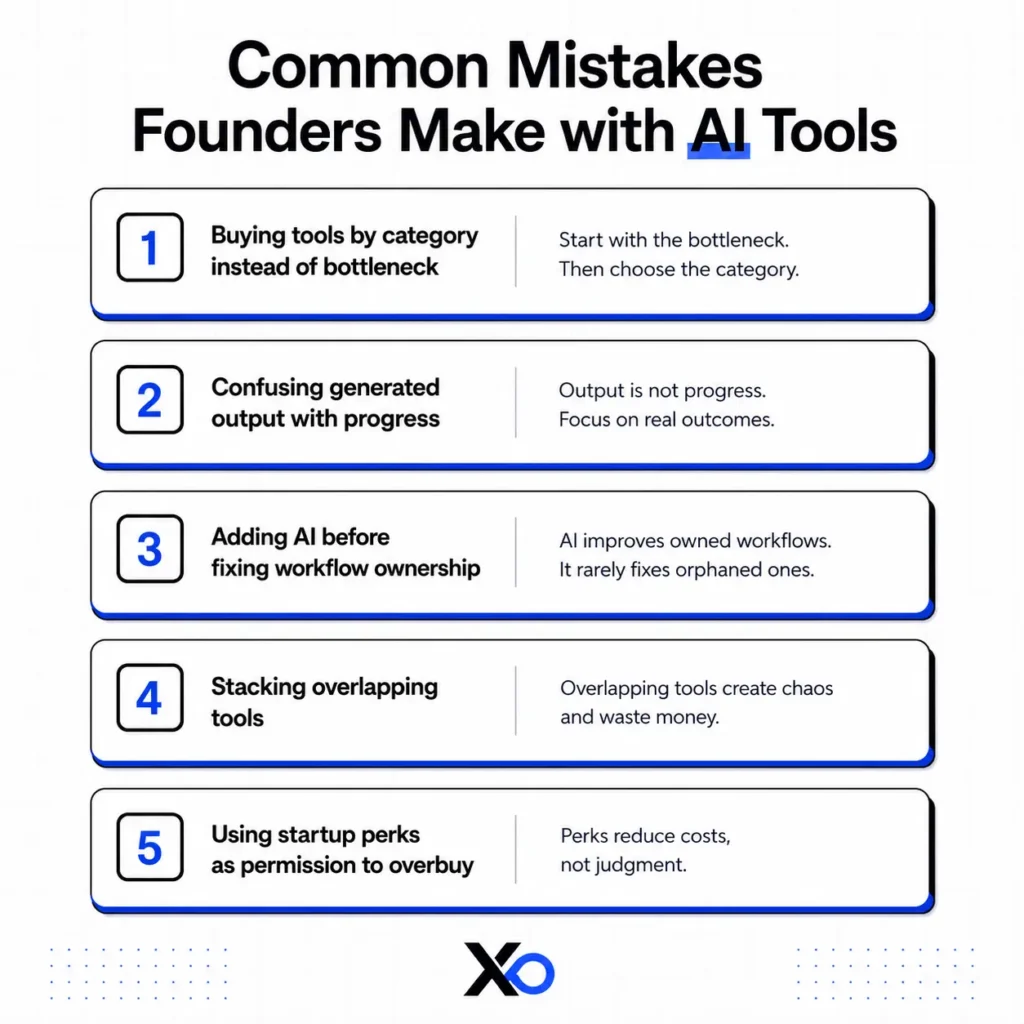
Mistake 1: buying tools by category instead of bottleneck
Founders hear that every startup needs an AI writer, AI SDR, AI support agent, AI meeting assistant, AI coding tool, AI designer, and AI automation tool.
That is category-first thinking. It leads to a stack that looks complete but does not match the work.
Start with the bottleneck. Then choose the category.
Mistake 2: confusing generated output with progress
AI can produce drafts, summaries, mockups, code, lists, scripts, and plans quickly. That speed feels like momentum.
But progress is not the number of generated artifacts. Progress is a shipped product, clearer customer insight, better conversion, faster support, stronger pipeline, or a decision the team can make with more confidence.
Mistake 3: adding AI before fixing workflow ownership
An AI sales tool will not fix sales when nobody owns outbound. An AI support tool will not fix activation when nobody owns onboarding. Without code quality review, an AI coding assistant can increase maintenance risk.
AI improves owned workflows. It rarely fixes orphaned ones.
Mistake 4: stacking overlapping tools
Many founders pay for several tools that all write, summarize, search, automate, or generate similar outputs.
The cost is not only subscription spend. The cost is scattered context. Customer notes live in one place, meeting summaries in another, automations in another, and strategy drafts somewhere else.
Use fewer tools with clearer roles.
Mistake 5: using startup perks as permission to overbuy
Startup perks, credits, discounts, and trials are useful when they reduce the cost of work you already need to do.
They become dangerous when founders collect tools because the deal feels good.
Free or discounted software still creates onboarding, maintenance, security, data, renewal, and switching costs. Use XRaise to compare options, but choose based on workflow fit.
What Should Founders Try First?
If you are starting from zero, do not build a large AI stack.
Start with four jobs:
- A reasoning and research assistant for strategy, synthesis, and writing.
- A product or coding assistant for prototypes, implementation, and tests.
- A sales or customer learning workflow for ICP research, notes, and follow-up.
- An operations assistant or automation tool for repeated internal work.
This gives you coverage across thinking, building, selling, and operating without drowning the team in tools.
After 30 days, review each tool:
- What workflow did it improve?
- What output did it create?
- What decision did it support?
- What work would be slower without it?
- Who owns renewal?
Keep the tools with proof. Cut the tools with vibes.
FAQ: Founder AI Tools in 2026
What are the best founder AI tools in 2026?
The best tools depend on workflow, but most founders should evaluate tools for research, coding, product design, marketing, sales, support, operations, analytics, and AI infrastructure. The strongest options create a concrete output and improve a real startup decision.
Which AI tools for startups should early teams choose first?
Early teams should usually start with a general reasoning tool, an AI coding or product-building tool, a workspace or knowledge tool, and one GTM workflow. AI tools for startups should be added around bottlenecks, not collected by category.
Are AI sales tools worth it for founders?
AI sales tools are worth it when the ICP, message, and qualification rules are already becoming clear. If the founder does not know who converts or why, AI sales tools usually scale confusion.
Do AI automation tools save time for small teams?
AI automation tools can save time when the workflow already repeats. They are risky when founders automate too early, before they understand which steps matter and which should be removed.
How should founders avoid AI tool sprawl?
Use one owner per tool, one job per tool, and one renewal review every 30 days. If a tool does not improve speed, quality, learning, or decisions, remove it from the stack.
Final Takeaway
AI does not make a startup faster by existing in the stack.
It makes a startup faster when it removes a real bottleneck between the founder and proof.
That is the standard. The demo can look impressive, the feature list can be long, and another founder may have posted about it. None of that matters as much as whether the tool helps the startup make better progress before the next renewal date.
The right AI tool should create speed where the team already has a real workflow. That could mean faster learning, faster shipping, better sales follow-up, stronger support, or less operational drag. The standard is simple: useful output, clearer decisions, clear ownership, and a reason to stay in the stack.
The wrong AI tool does the opposite. It creates more surfaces to check, more context to manage, more drafts nobody ships, more dashboards nobody reads, and more subscriptions that make the startup feel modern while the real bottleneck stays untouched.
So use one hard rule:
Do not buy AI for capability. Buy AI for proof.
If a tool helps you reach the next proof point faster, test it. If it only makes the stack look more advanced, skip it. The founder advantage in 2026 will not come from having the most AI tools. It will come from knowing exactly which ones make the company move.