Last verified: June 7, 2026
TL;DR
- Google Cloud credits for startups can help reduce early infrastructure costs for eligible teams building on Google Cloud, Firebase, AI, and data products.
- The main value is runway extension, but billing visibility, eligibility, usage limits, and post-credit cost matter.
- It is best for AI-first, data-heavy, Firebase, SaaS, and cloud-native startups that already have a real GCP use case.
- Before you apply, review the Google Cloud startup perk through XRaise and confirm the credit path, eligibility, billing rules, and renewal impact.
What is Google Cloud Credits for Startups?
Google Cloud credits for startups are startup program credits designed to help eligible companies cover qualifying Google Cloud and Firebase usage. Rather than treating infrastructure as an immediate cash drain, the program can give your team more room to build, validate, and learn before the cloud bill becomes a larger monthly line item.
For founders, the important word is “qualifying.” Credits may help with real GCP usage, but you still need to understand which services are covered, when credits expire, who owns billing, and what happens after the credit window ends. For those timing and post-credit questions, use the cloud credit runway planning guide.




Google Cloud is especially relevant when your startup is building around AI infrastructure, data pipelines, analytics, app backends, Firebase, BigQuery, Vertex AI, Gemini, or scalable cloud services. It is less compelling if your product has no clear GCP dependency or if your team is choosing Google Cloud only because credits are available.
How does it work?
✓ You Choose a Credit Path That Matches Your Stage
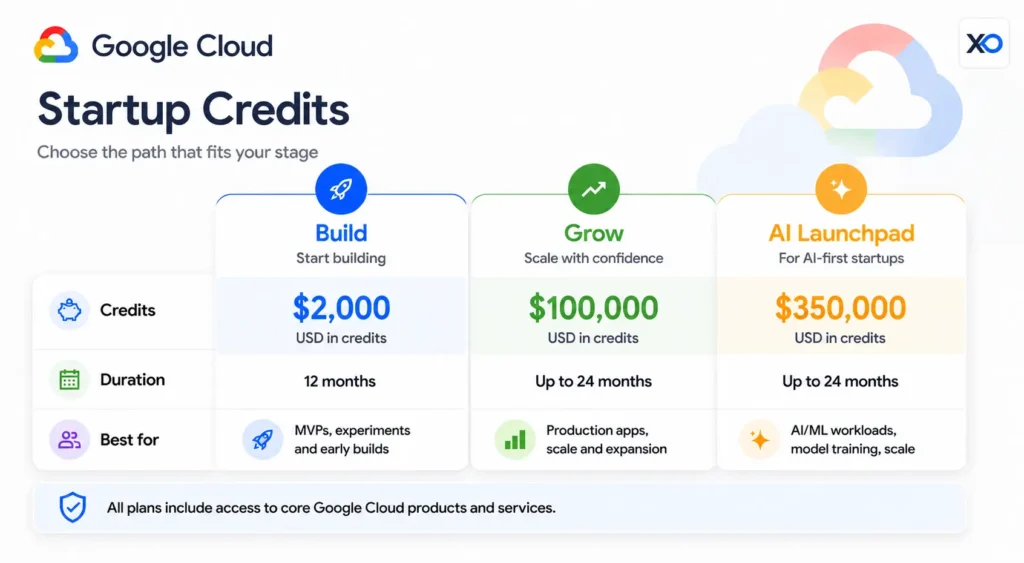
Google describes startup support across early build stages and later growth paths. Public program materials currently reference a pre-funded credit path for MVP building and higher credit coverage for eligible startups over the first two years, including a higher path for qualifying AI startups.
Do not plan around the highest number until you know your startup qualifies. Treat the credit ceiling as something to verify, not a budget you already own.
✓ You Map Credits to Real Infrastructure Work
The strongest use case is simple: use Google Cloud startup credits to pay for infrastructure your team already needs. That might include hosting, databases, storage, analytics, AI workflows, Firebase apps, model experimentation, or production workloads.
If you cannot name the workload, owner, and expected monthly usage, wait. Credits are most useful when they support a real milestone, not vague future infrastructure.
✓ You Monitor Billing from Day One
Cloud credits can make early usage feel painless, but they do not remove the need for cost ownership. Someone on your team should manage budgets, alerts, project structure, permissions, labels, and usage reviews.
That habit matters because the post-credit bill becomes part of your runway math. A product that looks cheap during the credit window may be expensive once usage moves to paid billing.
The Main Features and Benefits of Google Cloud Credits for Startups

Startup Cloud Credits
The main benefit is reduced eligible Google Cloud and Firebase spend while your team builds and validates the product.
Strong AI and Data Fit
Google Cloud can be a strong match for teams working with AI, analytics, data infrastructure, BigQuery, Vertex AI, Gemini, or model-driven product workflows.

Startup Perks AI Assistant
Have questions about credits? Let's chat instantly.
Firebase Support
Firebase makes Google Cloud especially useful for startups building mobile apps, web apps, authentication flows, realtime features, and fast MVPs.
Scalable Cloud Foundation
GCP gives technical teams access to compute, storage, networking, databases, observability, security, and developer services that can support production growth.
Runway Planning Support
When credits are tied to a clear roadmap, they can help you preserve cash while you test architecture, customer demand, and unit economics.
Is Google Cloud Credits Right for Your Business? Pros and Cons
Google Cloud Credits for Startups fits your company when your priority is building a serious technical product on GCP, especially if your team wants AI, data, Firebase, and cloud infrastructure support without absorbing the full early bill immediately.
| Best fit | Wait if |
|---|---|
| You are building AI, data, Firebase, SaaS, or cloud-native infrastructure. | You only want credits and do not have a real GCP workload. |
| You can assign someone to monitor billing, budgets, and usage. | No one owns cloud cost visibility yet. |
| Your product roadmap already depends on Google Cloud services. | Your team is likely to switch providers soon. |
| Credits help you reach a clear milestone before spend rises. | You cannot estimate post-credit monthly costs. |
Pros
- Strong AI and data ecosystem: Google Cloud is a serious option for model, analytics, and data-heavy products.
- Firebase advantage: Firebase can help small teams ship app experiences faster.
- Runway relief: Credits can reduce early cash burn when tied to real usage.
- Scalable infrastructure: GCP can support a path from prototype to production.
- Founder-friendly fit: The program can be useful when you know what you are building and why GCP supports it.
Cons
- Eligibility matters: The highest credit paths are not available to every startup.
- Billing can surprise you: Credits do not replace budgets, alerts, and usage review.
- Service coverage may vary: You need to confirm what the credit applies to before relying on it.
- Post-credit costs still count: Your runway model needs the paid bill after credits expire.
- Provider fit matters: Credits can create pressure to build on a stack that may not be right long term.
Use Google Cloud credits when the platform helps you build the product better, faster, or more responsibly. Do not use them as the only reason to choose GCP.
Pricing Plans
Google Cloud pricing is mostly usage-based. Instead of simple SaaS tiers, your bill depends on which services you use, how much you consume, where workloads run, and whether you use pricing tools such as the Google Cloud Pricing Calculator, free tier resources, committed use discounts, or other cost controls.
Before you claim it, check the discount, eligibility, billing cycle, plan rules, and renewal pricing on the XRaise listing. For exact infrastructure pricing, review Google’s official pricing pages and model your expected usage before moving production workloads.
Save on Google Cloud Credits for Startups with the XRaise Perk
The best startup perks are not the ones you claim and forget. They are the ones that support work you already need to do. If Google Cloud is on your roadmap, check the XRaise-listed perk for Google Cloud startup credits and use it to validate fit before creating a larger infrastructure commitment.
Who is it best for?
This perk is best for technical startups that already have a GCP-shaped need: AI workflows, Firebase apps, data products, analytics infrastructure, cloud-native SaaS, or production systems that benefit from Google Cloud services.
If you are still comparing broad infrastructure paths, start with the XRaise startup perks directory, then compare cloud credits, eligibility, and workload fit side by side.
What Is the Best Alternative to Google Cloud Credits for Startups for Cloud Credits?
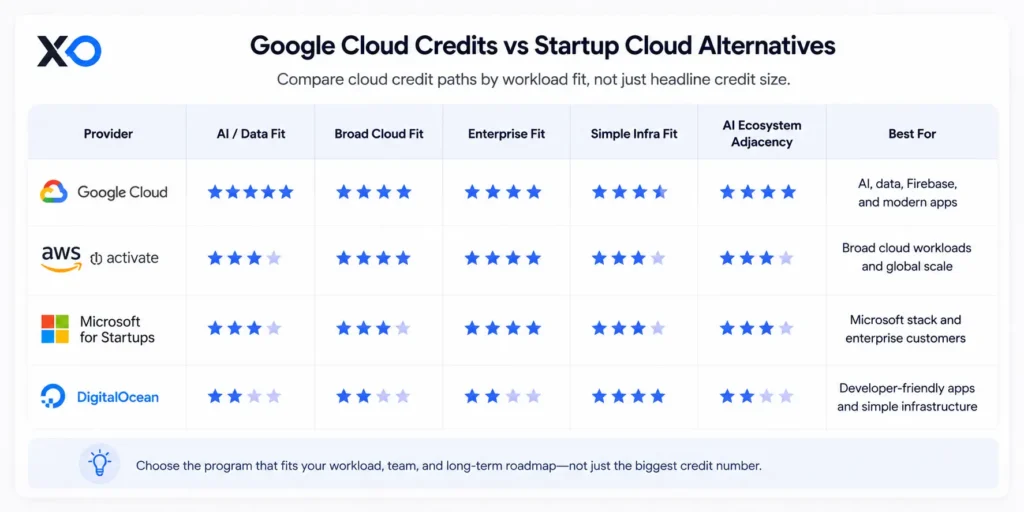
AWS Activate
Choose AWS Activate if your startup needs a broad cloud ecosystem, flexible infrastructure services, mature tooling, or an AWS-first technical path. Review the AWS Activate perk on XRaise before choosing.
Microsoft for Startups
Choose Microsoft for Startups if Azure, Microsoft customers, enterprise SaaS, or Microsoft-aligned AI services are central to your go-to-market or product strategy.
DigitalOcean Startup Program
Choose DigitalOcean Startups if your team wants simpler cloud infrastructure and a lighter operating model than a hyperscaler.
For broader planning, use XRaise’s Best Cloud Credits for Startups guide and startup eligibility guide to compare credit size, eligibility, and timing.
What Customers Say About Google Cloud
What people generally like about Google Cloud
Google Cloud is often valued for its data products, AI tooling, developer infrastructure, Firebase ecosystem, and technical depth. For startups already building around those workflows, the platform can feel like a natural base rather than an extra layer.
What people generally dislike about Google Cloud
The most common practical concerns are cloud cost complexity, learning curve, service selection, billing visibility, and the need to manage usage carefully. Those are not reasons to avoid GCP, but they are reasons to set budget controls early.
Watch Google Cloud Next ’26 to see how AI, Gemini, TPUs, and agentic workflows are shaping the next wave of startup infrastructure.
Key Takeaways
- Google Cloud credits for startups are most useful when your product already has a clear GCP workload.
- The Google Cloud startup program can be especially relevant for AI, data, Firebase, and cloud-native products.
- Startup credits help runway only when you track usage, eligibility, expiration, and post-credit pricing.
- Before applying, review the Google Cloud perk through XRaise and compare alternatives if AWS, Azure, or DigitalOcean fit better.
FAQ
Is there a Google Cloud promo code or startup offer available?
There is an XRaise-listed Google Cloud startup credits perk. Before you claim it, check the discount, eligibility, billing cycle, plan rules, and renewal pricing on the XRaise listing.
What are Google Cloud credits for startups used for?
Google Cloud startup credits are typically used for eligible cloud and Firebase usage, such as hosting, compute, databases, storage, analytics, AI services, app backends, and production infrastructure.
Who is the Google Cloud startup program best for?
The Google Cloud startup program is best for startups building AI products, data platforms, Firebase apps, cloud-native SaaS, or technical products that already fit the GCP ecosystem.
Are GCP credits for startups enough to cover all cloud costs?
Not always. GCP credits for startups may reduce eligible usage, but coverage, limits, expiration, and excluded services need to be checked before you rely on them for runway planning.
Google Cloud vs AWS Activate: what’s the practical difference?
Google Cloud often fits AI, data, Firebase, and Google-native workflows. AWS Activate is broader for general infrastructure and mature cloud services. The better choice depends on your workload, team skill, and post-credit cost.
Should I apply for Google Cloud startup credits before choosing a cloud provider?
You can review the perk early, but choose the provider based on workload fit first. Credits are useful only if the platform still makes sense after the credit period ends.
Should You Choose Google Cloud Credits for Startups for Your Team?
If your priority is building an AI, data, Firebase, or cloud-native product with infrastructure your team can actually manage, Google Cloud Credits for Startups is one of the most practical credit paths to consider. It is especially strong for startups that want serious technical infrastructure, strong data services, and room to test before cloud spend becomes a larger cash burden.
If you’re on the fence, run a real two-week planning test with expected workloads, pricing estimates, billing alerts, and a post-credit monthly cost model. Do not judge the program from the headline credit amount only.
Before you commit, check the Google Cloud startup perk on XRaise to see whether you can reduce the cost while testing the product properly.
Offer details, credit amounts, pricing, eligibility, billing rules, and redemption steps can change. Before applying or committing infrastructure budget, review the XRaise listing, Google’s official startup program pages, and Google Cloud pricing pages. Google Cloud, Firebase, Vertex AI, Gemini, and related product names, logos, and trademarks belong to their respective owners. This article does not imply an official partnership unless separately verified.