Last verified: June 9, 2026
TL;DR
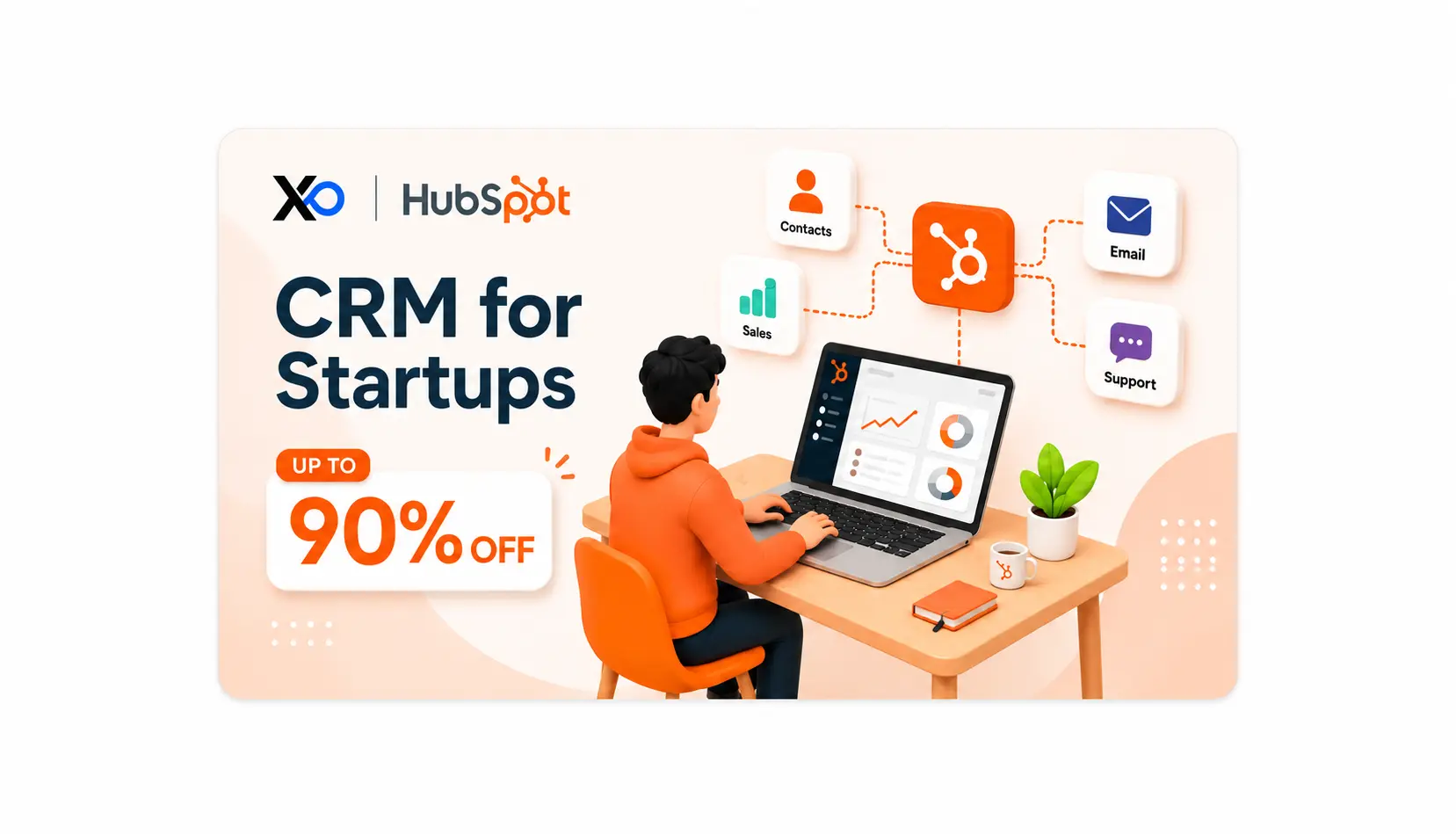
- HubSpot for startups is a strong fit when you need one connected CRM, marketing, sales, and service platform instead of scattered GTM tools.
- The main value is customer-data visibility, but pricing, onboarding, seats, contacts, and renewal planning matter.
- It is best for startups with active leads, repeatable follow-up, growing marketing lists, or sales and support workflows that need structure.
- Before you claim it, review the HubSpot startup perk through XRaise and confirm the discount, eligibility, billing cycle, plan rules, and renewal pricing.
What is HubSpot?
HubSpot is a customer platform built to help teams manage customer relationships through a shared CRM, marketing tools, sales software, service workflows, content tools, data sync, commerce features, and AI-assisted work. Rather than forcing every function into a separate tool, it helps you answer one practical question: “Can our team see, manage, and grow customer relationships from one place?”
For early teams, HubSpot is usually most useful once founder-led sales has real follow-up risk, marketing is collecting leads, or support conversations need memory. If you are still choosing which startup perks deserve attention, the XRaise guide to startup perks for founders is a helpful companion.
Related Posts
How does it work?
✓ Start with the CRM as the Source of Truth
You add contacts, companies, deals, activities, and customer history into HubSpot’s Smart CRM. This becomes the shared base for sales, marketing, service, and reporting.
✓ Add the Hubs Your Workflow Actually Needs
HubSpot is sold through hubs and platform bundles. A startup might begin with CRM and Sales Hub, then add Marketing Hub, Service Hub, Content Hub, Data Hub, or Commerce tools only when the workflow is ready.
✓ Automate Follow-Up and Measure What Is Working
The platform becomes more valuable when your team uses it daily: forms capture leads, email sequences support follow-up, pipelines show deal movement, tickets track support, dashboards show what needs attention, and Breeze AI features help with content, prospecting, engagement, and support tasks.
The Main Features and Benefits of HubSpot
Smart CRM
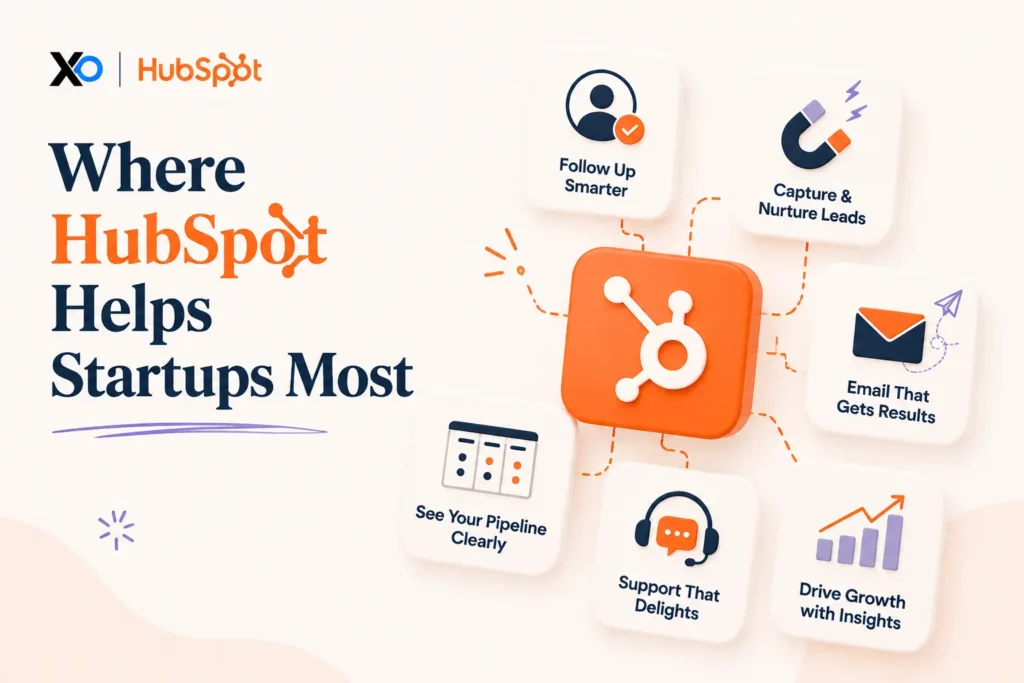
HubSpot gives your team one customer database for contacts, companies, deals, activities, tickets, and customer context.
Marketing Automation
Marketing Hub helps you manage forms, landing pages, email campaigns, lead nurturing, ads, lists, and campaign reporting.
Sales Pipeline Tools
Sales Hub supports deal tracking, meetings, email templates, sequences, forecasting, tasks, and sales reporting.
Service Workflows
Service Hub helps teams manage tickets, shared inboxes, knowledge base workflows, customer support, and service reporting.
Breeze AI
HubSpot’s Breeze AI features can help with prospecting, content creation, customer engagement, and support workflows when your team has a clear review process.
Integrations
HubSpot says it connects with more than 1,700 apps, which helps if your team already uses tools such as Gmail, Outlook, Slack, Zoom, Stripe, or website platforms.
Is HubSpot Right for Your Business? Pros and Cons
HubSpot fits your company when your priority is building a cleaner customer operating system, especially if your team wants CRM visibility, marketing automation, sales follow-up, and service workflows without stitching together too many disconnected tools.
| Best fit | Wait if |
|---|---|
| You have real leads, follow-ups, campaigns, or customer conversations to manage. | You are still pre-customer and do not have a repeatable GTM motion. |
| You want sales, marketing, and service data in one connected system. | A simple spreadsheet or lightweight CRM still covers the workflow. |
| Someone can own fields, stages, automation, hygiene, and renewals. | Nobody will maintain CRM data quality after setup. |
Pros
- Strong all-in-one platform: HubSpot can connect CRM, marketing, sales, service, content, operations, and commerce in one system.
- Startup-friendly discount path: Eligible startups can review a meaningful first-year discount through XRaise.
- Easy adoption curve: HubSpot is known for being approachable compared with many enterprise CRM systems.
- Useful free and Starter entry points: Small teams can test basic CRM and Starter workflows before moving into larger plans.
- Broad integration ecosystem: HubSpot connects with many common sales, marketing, support, finance, and productivity tools.
Cons
- Cost can rise quickly: Seats, hubs, marketing contacts, onboarding, and advanced features can make the bill grow as your team scales.
- Setup still needs ownership: A CRM becomes messy fast if stages, properties, lists, and automations are not maintained.
- Advanced features may sit behind higher tiers: Some workflows require Professional or Enterprise products.
- The all-in-one model can be too much early: If your GTM process is still undefined, HubSpot may add structure before you need it.
- Renewal planning matters: A discounted first year is useful only if standard pricing still makes sense later.
HubSpot is a strong fit when your customer workflow already has enough volume to benefit from one source of truth. If you are still testing ICP, positioning, or sales motion, start smaller and avoid turning a CRM into a planning project.
Pricing Plans
HubSpot pricing depends on product hubs, bundle choice, seat type, billing cycle, marketing contacts, onboarding requirements, and whether you buy Starter, Professional, or Enterprise products. The official HubSpot pricing page should be treated as the source of truth before you subscribe.
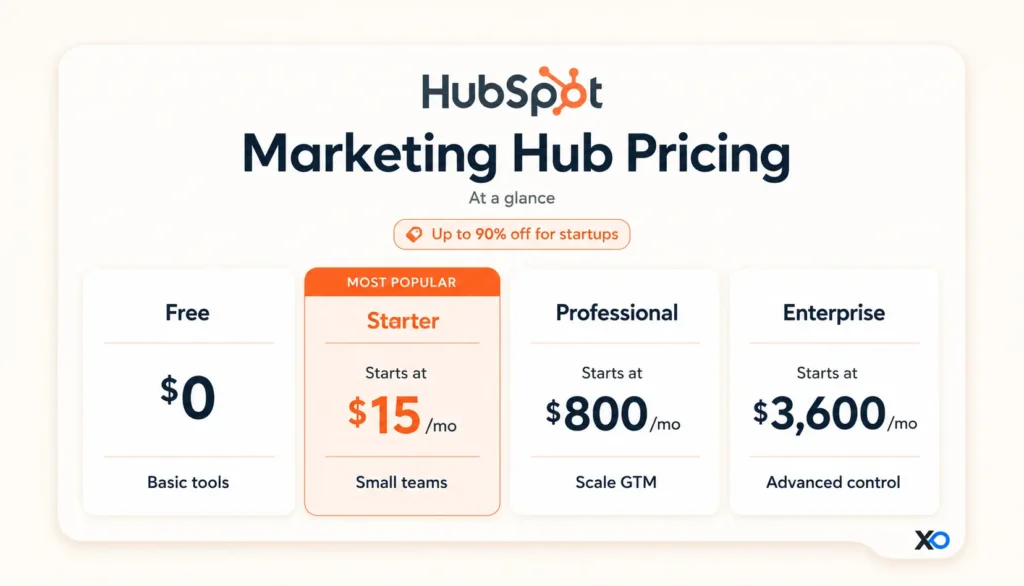
Pricing can change, and HubSpot’s final cost can depend on the exact hub mix you choose. Before you commit, review the official pricing page, onboarding requirements, marketing contact tiers, seat needs, billing cycle, renewal pricing, and what happens after any startup discount period ends.
If you are planning the wider operating stack around HubSpot, the XRaise guide to startup tools for founders can help you separate the CRM decision from the rest of your SaaS stack.
Save on HubSpot with the XRaise Perk
The best startup perks are not the ones you claim and forget. They are the ones that support work you already need to do. If HubSpot is on your roadmap, check the XRaise-listed perk for up to 90% off and up to $4,000 in savings, then use it to validate fit before adding a long-term customer platform cost.

HubSpot for Startups
Up to 90% discount on an AI-powered customer platform.
How to use the HubSpot perk
- Open the HubSpot offer page on XRaise.
- Review the discount, promo code, credit path, or claim steps.
- Check eligibility, plan rules, billing cycle, and renewal pricing.
- Use it only if the tool fits a workflow you are ready to test.
Who is it best for?
This perk is best for startups that already need CRM, email automation, lifecycle workflows, sales follow-up, customer support, or revenue reporting.
Before you claim it, check the discount, eligibility, billing cycle, plan rules, and renewal pricing on the XRaise listing.
What Is the Best Alternative to HubSpot for CRM and GTM?
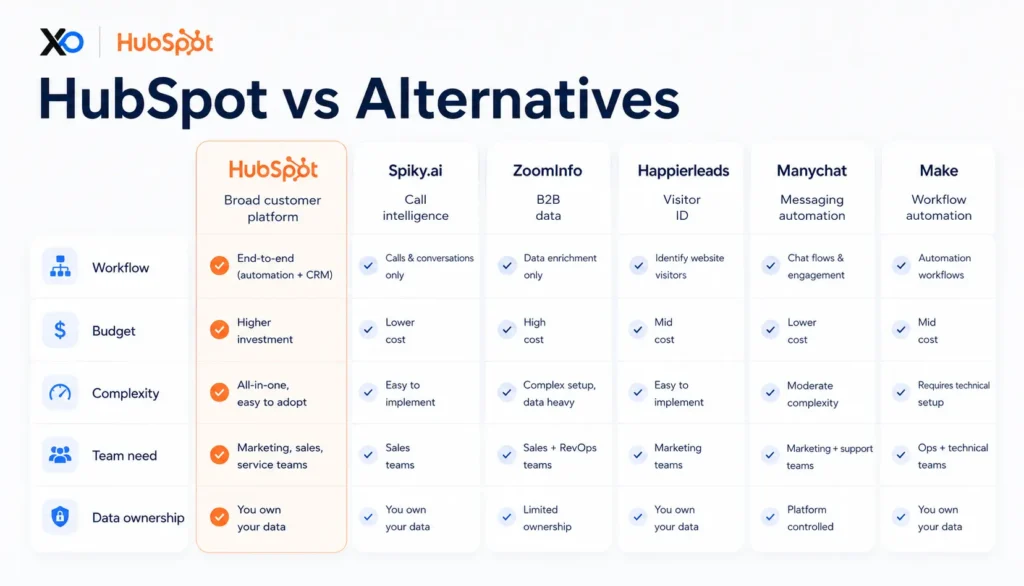
HubSpot may be the right fit if you want a connected CRM, marketing, sales, and service platform, but it is not the only path. If your startup needs only one part of the GTM workflow, compare it with related startup perks available on XRaise before choosing.
Spiky.ai
Choose Spiky.ai if your bottleneck is sales-call coaching, meeting intelligence, CRM-ready summaries, and follow-up quality. The XRaise article on the Spiky.ai startup perk is especially useful if HubSpot is already your CRM and calls are where the process breaks.

Spiky.ai for Startups
Up to $1,000 credits on AI intelligence for sales calls.
ZoomInfo
Choose ZoomInfo if your main issue is B2B contact data, account research, prospecting, or sales intelligence rather than CRM operations.

ZoomInfo for Startups
Free trial access to AI-driven B2B intelligence.
Manychat
Choose Manychat if your customer conversations are concentrated in chat, social messaging, or automated engagement flows rather than full CRM and revenue operations.

Manychat for Startups
30% off for 3 months on automation for social engagement.
Make
Choose Make if your data already lives in several apps and your main problem is connecting workflows instead of adopting a full customer platform.

Make.com for Startups
Free Teams plan for AI-powered no-code automations.
If your real need is a lighter relationship CRM, the XRaise guide to the Folk CRM free trial for startups is a useful comparison point, but that perk was not available in the local startup perks sitemap used for this article.
What Customers Say About HubSpot
What people generally like about HubSpot
Verified review pages and recent software reviews commonly point to HubSpot’s ease of use, approachable CRM, strong free entry point, useful automation, reporting, integrations, and the value of having marketing, sales, and service context in one place.
What people generally dislike about HubSpot
Common cautions focus on pricing as teams scale, feature limits on lower tiers, the jump into Professional or Enterprise plans, contact and seat complexity, and the need to keep CRM data clean. These are not reasons to avoid HubSpot by default, but they are reasons to test with real workflows before committing.

Startup Perks AI Assistant
Have questions about credits? Let's chat instantly.
Key Takeaways
- HubSpot for startups is most useful when your team has real leads, follow-up, customer support, or lifecycle workflows to manage.
- The XRaise-listed HubSpot perk shows up to 90% off and up to $4,000 in savings, but you should check eligibility, plan rules, and renewal pricing before claiming.
- HubSpot is strongest when sales, marketing, and service teams need one shared customer system.
- Pricing can rise as you add hubs, seats, contacts, onboarding, and advanced features.
- If you only need one GTM workflow, compare adjacent XRaise perks such as Spiky.ai, ZoomInfo, Happierleads, Manychat, or Make.
- A CRM is only valuable if your team keeps the data trustworthy.
FAQ
Is there a HubSpot promo code or startup offer available?
Yes. The XRaise-listed HubSpot perk shows up to 90% off and up to $4,000 in savings. You should check the XRaise listing for the exact discount, eligibility, billing cycle, plan rules, and renewal pricing before claiming.
What do teams typically use HubSpot for?
Teams use HubSpot for CRM, lead capture, email marketing, sales pipelines, customer support, reporting, landing pages, automation, customer data, and lifecycle management.
What type of CRM tool is HubSpot?
HubSpot is more than a standalone CRM. It is an AI-powered customer platform that connects CRM, marketing, sales, service, content, data, commerce, automation, and reporting.
HubSpot vs Spiky.ai: what’s the practical difference?
HubSpot is the broader customer platform and CRM system. Spiky.ai is more focused on sales-call intelligence, coaching, summaries, and CRM-ready meeting workflows.
Is HubSpot easy to use for non-technical teams?
HubSpot is generally considered approachable for non-technical teams, especially at the Free and Starter levels. Professional and Enterprise workflows still need an owner for setup, fields, automations, reporting, and data hygiene.
What CRM tool do startups use the most?
There is no single best CRM for every startup. Choose based on your sales motion, marketing needs, support volume, budget, team size, integration needs, and whether someone will maintain the CRM every week.
Should You Choose HubSpot for Your Team?
If your priority is customer growth with a system your team will actually maintain, HubSpot is one of the most practical options to consider. It is especially strong for startups that want CRM visibility, marketing automation, sales follow-up, service workflows, and reporting in one connected platform.
If you’re on the fence, run a real two-week test with live workflows, real users, and real follow-ups. Do not judge it from a sandbox demo only.
Before you commit, check the HubSpot startup perk on XRaise to see whether you can reduce the cost while testing the product properly.
Offer details, pricing, eligibility, billing rules, redemption steps, and renewal terms can change. Check the XRaise listing and HubSpot pricing page before committing.Product names, logos, and trademarks belong to their respective owners. This article should not imply official partnership unless that relationship is verified by XRaise and the provider.