TL;DR
- Check discounts before paying or renewing.
- Start with cloud, AI, CRM, analytics, developer, marketing, and ops tools.
- A discount is useful only if it supports an active workflow.
- Do not claim perks that create unused tools or renewal risk.
- Use XRaise to compare startup perks before adding another paid plan.
Why Startup Discounts Matter Now
In 2026, software spend arrives earlier than operating discipline. A pre-seed team can pay for cloud infrastructure, AI APIs, CRM, analytics, collaboration tools, landing pages, forms, payroll, and support software before it has a repeatable customer motion.
That is not automatically bad. Many tools are necessary. The problem is paying full price before checking whether the same category has startup credits, founder discounts, or partner programs that could reduce burn while the team is still learning.
The right discount can extend the number of product tests, sales experiments, or infrastructure iterations a founder can run. The wrong discount can do the opposite: it makes a tool feel cheap enough to adopt before the workflow is real.


The founder goal is simple: do not collect every offer. Check the right offer before paying for a tool that already matches your next milestone.
The Founder Problem: Paying Before Checking
Founders usually miss savings because the purchase happens during urgency. A technical founder upgrades cloud services during a launch. A sales founder buys CRM seats before checking startup programs. An AI founder adds model, voice, or automation tools before comparing AI credits for startups. A bootstrapped founder starts paying for productivity apps because each one looks small in isolation.
The stack gets expensive later. Free plans hit limits. Seats multiply. Usage pricing rises. Annual commitments renew. By the time someone audits the stack, the startup is no longer asking, “Is this tool useful?” It is asking, “Why did our operating costs grow before our proof did?”
That is the job of a discount check. It creates one pause between tool urgency and paid commitment:
- Is there a startup program for this category?
- Are we eligible now?
- Will we use the credit before it expires?
- What happens after the discount ends?
- What proof should this tool create?
The Check Before Pay Framework
Use this central framework before claiming any offer:
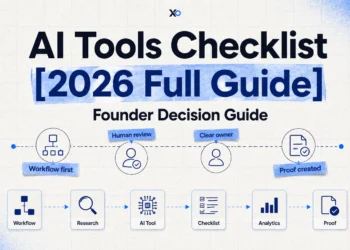
Workflow -> Eligibility -> Timing -> Renewal -> Proof
Workflow
Name the real job first. Hosting production workloads, qualifying leads, measuring activation, collecting user research, running support, or managing payroll are workflows. “We might need it later” is not.
Eligibility
Check the terms before planning around the savings. Many startup founder programs depend on funding stage, employee count, region, partner affiliation, previous customer status, or product type.
Timing
Activate credits only when the workflow is ready. A twelve-month credit claimed too early can expire while the company is still validating.
Renewal
Model the second-year cost. Review seat pricing, usage limits, annual commitments, downgrade paths, and migration cost before the tool becomes part of the operating system.
Proof
The offer should help create evidence: customer demand, product activation, sales repeatability, lower infrastructure cost, better support, cleaner hiring operations, or clearer retention data.
10 Startup Discounts Founders Should Check Before Paying
1. Cloud Credits for Startups
Cloud credits for startups should be checked before paying for hosting, databases, storage, AI infrastructure, staging environments, or production workloads. Current provider pages for AWS Startups, Google Cloud Startups, and Microsoft for Startups describe startup credit or technical benefit paths.
Use this category when you are shipping an MVP, launching real users, or running infrastructure-heavy tests. Wait if you are still validating with interviews, mockups, or a no-code landing page. Compare credit amount, eligible services, expiration, support, overage controls, and migration cost.
Check on Google Cloud Credits for Startups, Azure Credits for Startups, and AWS Activate through XRaise.
2. AI Credits for Startups
AI credits for startups matter when AI is part of the product value, not just an internal experiment. This category includes voice APIs, model platforms, inference tools, transcription, automation, and AI infrastructure.
Use AI credits when you need to test quality, latency, accuracy, privacy, and cost per user. Wait if the plan is only “add AI later.” Compare credit size, API limits, data policy, production pricing, and whether the provider supports your real use case.
See Deepgram for Startups and ElevenLabs Promo Code 2026.
3. Developer Platform Discounts
Developer workflow discounts can cover code hosting, CI/CD, security scanning, packages, issue tracking, and AI coding tools. GitHub for Startups, for example, describes credits for eligible partner-affiliated startups across GitHub Enterprise, Copilot, Advanced Security, Actions, and related usage.
Use this category when multiple engineers are shipping production code or security expectations are rising. Wait if one founder can still manage a simple repository. Compare seats, CI minutes, security features, AI allowances, admin overhead, and renewal billing.
4. CRM Discounts for Startups
Startup CRM discounts are worth reviewing before upgrading sales software. Pricing typically grows as teams add seats, automation, reporting, enrichment, marketing, and support add-ons.
Use a CRM discount when you have active leads, follow-ups, pipeline stages, customer notes, or a repeatable qualification process. Wait if a spreadsheet still captures every real conversation. Compare contact limits, automation, reporting, onboarding time, integrations, data portability, and second-year pricing.
Check on HubSpot through XRaise.
5. Product Analytics Discounts for Startups
Product analytics discounts help founders measure activation, retention, funnels, cohorts, feature adoption, and user behavior. They are valuable only after usage exists.
Use this category when you need to answer: where do users drop off, what predicts retention, and which segment behaves differently? Wait if you have no product usage yet. Compare event limits, monthly tracked users, session replay, experimentation, governance, exports, and downgrade paths.

Startup Perks AI Assistant
Have questions about credits? Let's chat instantly.
6. Marketing, Landing Page, and Ad Credits
Marketing discounts can reduce campaign testing costs, but they can also fund traffic before positioning is clear. This category includes ad credits, landing page builders, email tools, conversion tools, and SEO software.
Use these offers when you have a clear audience, message, conversion event, budget cap, and learning goal. Wait if you cannot explain who the campaign is for. Compare spend requirements, tracking, geographic limits, landing page limits, and new-customer rules.
Do not forget to check Google Ads Promo Code for Startups and Unbounce Discount for Startups.
7. Collaboration and Productivity Discounts
Productivity discounts are useful when the team is outgrowing founder memory. This category includes Notion, Slack, Miro, Asana, ClickUp, Tally, docs, tasks, whiteboards, and knowledge systems. Notion’s startup page describes free periods for eligible non-paying startups under employee thresholds.
Use this category when decisions, customer notes, tasks, or onboarding details are getting lost. Wait if ownership is unclear; software cannot fix a broken process. Compare seats, guests, AI features, admin controls, storage, lock-in, and renewal pricing.
8. Forms, Research, and No-Code Data Collection Discounts
Use startup software discounts for forms, scraping, surveys, waitlists, beta applications, and lightweight data collection when you need structured input from customers, testers, partners, or internal teams.
Wait if you will not act on the responses. Compare response limits, integrations, exports, privacy, automation, and custom domains. A form is useful when it improves learning; it is noise when it only makes the process feel official.
9. Customer Communication and In-App Support Discounts
Support tools matter when customer communication affects activation, retention, onboarding, or product experience. This includes live chat, help desk, in-app messaging, community tools, chat APIs, and AI support workflows.
Use these discounts when support patterns are repeatable or messaging is part of the product. Wait if founder-led email still works. Compare active users, message volume, SDK quality, routing, moderation, privacy, and usage-based pricing.
10. Finance, Payments, Payroll, Legal, and Ops Discounts
Ops discounts matter when manual work creates legal, financial, or compliance risk. This category includes payroll, contractor management, payments, accounting, expense tools, legal templates, cap tables, and compliance software.
Use ops discounts when hiring, payments, taxes, or documents are pulling founders away from customers and product. Wait if the workflow does not exist yet. Compare credit amount, regional coverage, legal responsibility, product coverage, and post-credit pricing.How to Use This Checklist Before Paying
How to Use This Checklist Before Paying
The best way to use this list is not to open every link and claim whatever looks generous. That turns a savings exercise into another task list. Instead, use it as a pre-payment checkpoint whenever a founder, operator, or engineer is about to upgrade a tool.
Start with committed spend
Start with committed spend. Look at the tools you are likely to pay for in the next thirty days. For a team preparing to launch, cloud and developer tools may come first. Founders booking more demos may get more value from CRM and email tools. When customers are active but behavior is unclear, analytics should move up the list. This order keeps the discount search tied to actual decisions.
Separate discounts from decisions
A large credit can make a tool feel obviously better, but the right question is whether the startup would still want the workflow after the discount ends. If the answer is no, the offer is probably buying activity rather than proof. If the answer is yes, the discount can lower the cost of testing a decision the team already needs to make.
Map each offer to the next milestone
Map each offer to the next milestone. At MVP stage, the priority may be shipping a stable product. Pre-seed teams often need to prove that a sales motion can repeat. By seed stage, activation, retention, or gross margin may matter more. A discount that supports the next milestone is useful. One that only supports an imaginary future company can wait.
Watch for renewal cliffs
Many founders model the first-year cost and forget the second year. Before claiming a discount, write down the full monthly price, expected seat count, likely usage, renewal date, downgrade path, and switching cost. This does not need to be complicated. A simple note is enough to stop an offer from turning into a surprise operating expense.
Give every claimed offer an owner
Someone should know why the tool exists, what it costs, when it renews, and what proof it should create. Without ownership, discounted tools become invisible. The founder remembers the savings, but no one checks whether the tool is being used well.
Treat unused credits as a signal
If the team claims a credit and does not use it, that usually means the workflow was not ready. That is not a moral failure. It is useful information. The answer is not to claim more offers. The answer is to tighten the workflow, delay activation, or cancel the tool before it becomes part of the stack by accident.
Run a weekly stack review
This is the discipline behind the Check Before Pay framework: look for savings, but only keep the ones that make the startup sharper.
A practical rhythm is to run a fifteen-minute stack review every Friday. Open the list of paid tools, new trials, and upcoming renewals. Ask three questions: did this tool support a real workflow this week, did it create evidence, and would we still choose it at full price? Keep the tool if the answer is clearly yes. If the value is uncertain, assign one owner and one proof metric for the next week. Cancel it if the answer is no, before the tool becomes background noise.
Search with a clear need
This habit is especially useful for founders who are moving fast across product, sales, hiring, and fundraising. It keeps purchasing decisions close to operating reality. It also makes XRaise more useful: instead of browsing offers randomly, the founder searches with a clear need, a stage, a category, and a decision already in mind.
Add a second checkpoint for expensive tools
For expensive categories, add a second checkpoint before the first paid invoice. Write the expected monthly cost, the discount window, the owner, the renewal date, and the one decision the tool should improve. Then set a calendar reminder for two weeks before the discount ends.
This keeps the team from discovering renewal risk after usage, data, integrations, and habits have already settled around the tool. It also makes the cancellation decision calmer, because the review happens before urgency returns and before the team has emotionally committed to keeping the software simply because setup took effort. That small pause is often where real runway discipline appears without slowing the company down at all.
Practical Comparison Table
| Category | Best for | Use when | Wait if |
|---|---|---|---|
| Cloud credits | MVPs and production workloads | You have real infrastructure usage | You are still validating manually |
| AI credits | AI-native products | AI drives product value | The use case is vague |
| Developer tools | Technical teams | Shipping and security need structure | One repo is enough |
| CRM | Founder-led sales | Leads and follow-ups repeat | A spreadsheet still works |
| Analytics | Product learning | Users are active | There is no product usage |
| Marketing | Channel tests | Audience and conversion are clear | Positioning is unclear |
| Productivity | Team coordination | Decisions are getting lost | Ownership is undefined |
| Ops | Hiring, payroll, finance | Manual work creates risk | The workflow is theoretical |
What to Do at Each Startup Stage
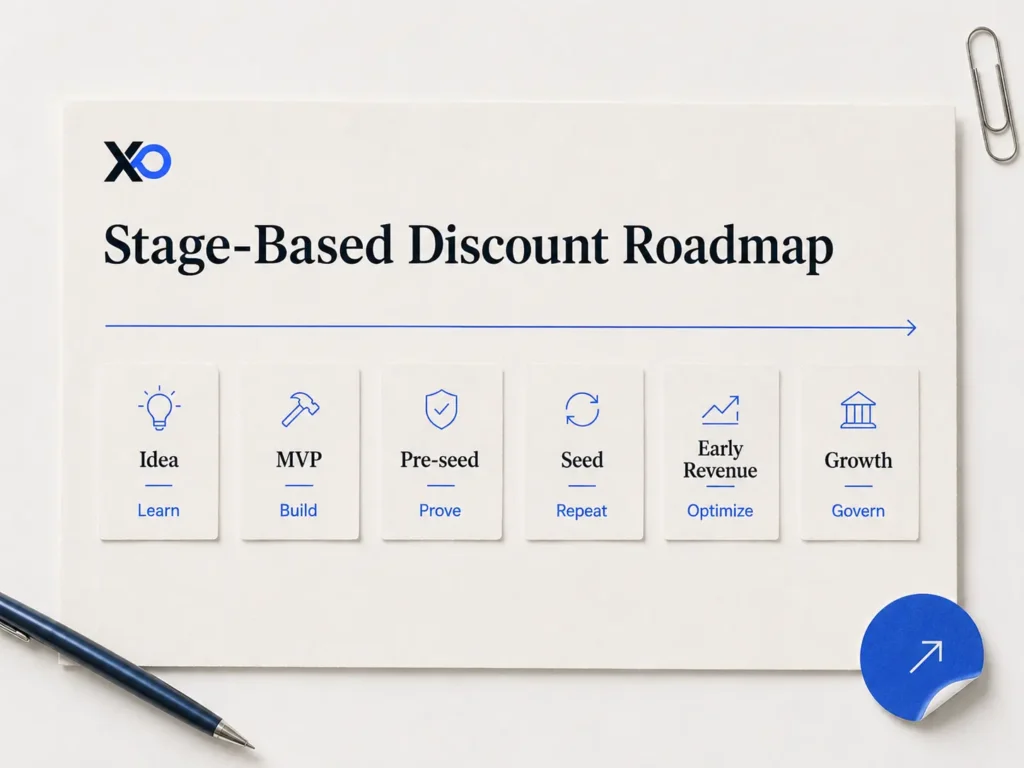
Idea Stage
Prioritize learning. Use free plans, simple docs, forms, and customer interviews. Avoid activating major credits before a real workflow exists. Measure problem frequency and intent.
MVP Stage
Check cloud, developer, AI, and basic analytics offers. Avoid collaboration bloat. Measure activation, reliability, usage, and feedback quality.
Pre-Seed
Check CRM, analytics, cloud, support, and marketing discounts tied to active experiments. Avoid annual commitments unless the workflow is clearly repeating. Measure sales cycle, conversion, retention signals, and runway impact.
Seed
Use more serious systems when they support repeatability. Check startup founder programs before increasing spend. Avoid claiming offers just because the budget is larger. Measure adoption, cost per workflow, and renewal exposure.
Early Revenue
Audit every tool against revenue, margin, retention, or customer delivery. Upgrade only where the tool helps sell, retain, support, or deliver more efficiently. Measure gross margin, CAC payback, and support load.
Growth Stage
Discounts still matter, but governance matters more. Review security, admin controls, procurement, integrations, and vendor risk before keeping tools from the early stack.
How to Choose Which Discounts Are Worth Claiming
Use these decision rules:
- Start with tools you are about to pay for in the next 30 days.
- Search for startup perks and startup credits before entering a card.
- Compare renewal pricing, not just first-year savings.
- Claim offers only when the workflow is active.
- Assign an owner for every tool.
- Define the proof the tool should create.
- Cancel or downgrade tools that do not change decisions.
Founder Use Cases
An AI SaaS founder should check cloud credits, AI credits, developer tools, and analytics before paying for production tooling. The goal is to test product value and cost per user.
A bootstrapped B2B founder should check CRM, landing page, research, email, and analytics offers. The goal is to learn whether demand and follow-up can repeat.
A seed-stage distributed team should check payroll, legal ops, collaboration, and support discounts. The goal is to reduce operational drag without building an enterprise stack too early.
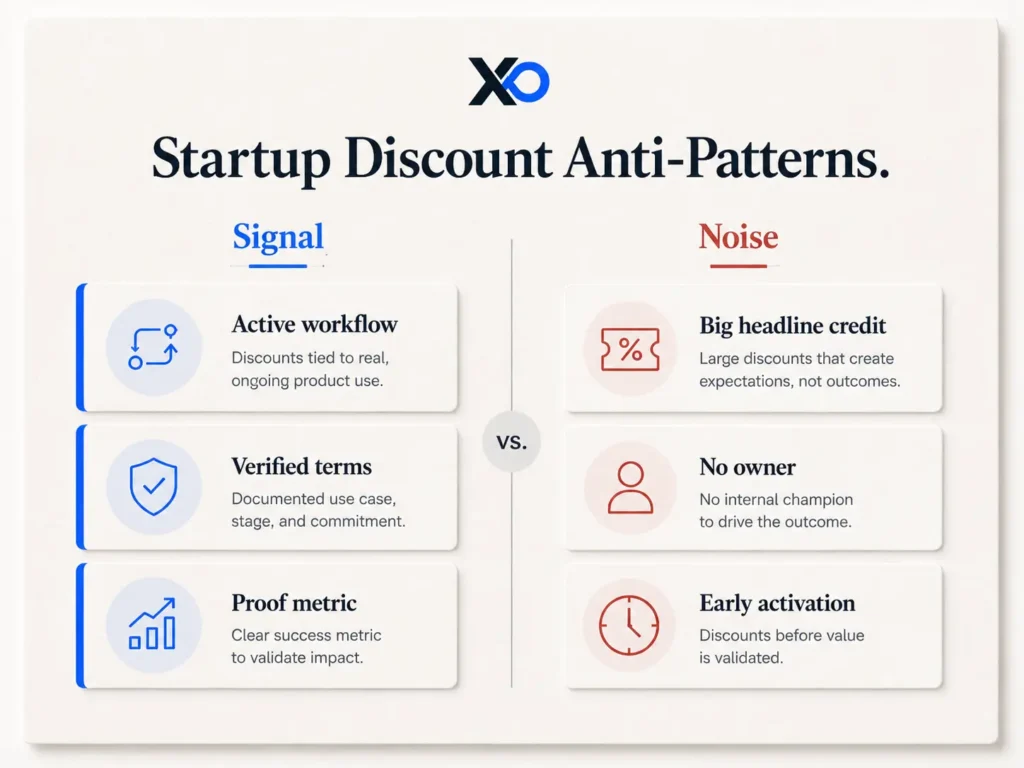
Mistakes and Anti-Patterns
Mistake 1: Claiming every discount
Founders do this because offers feel like free leverage. It hurts because every tool adds setup, ownership, and renewal risk. Claim only offers tied to active workflows.
Mistake 2: Comparing headline value
Large credits can hide expensive usage or renewal pricing. Calculate first-year, second-year, and overage cost before activation.
Mistake 3: Activating too early
Credits can expire before the team uses them. Wait until the tool has a job in the next 30 to 60 days.
Mistake 4: Copying later-stage stacks
Later-stage teams have different complexity. Choose the lightest tool that creates the proof you need now.
Mistake 5: Treating discounts as strategy
A discounted CRM does not create demand. A cloud credit does not define architecture. Define the business question first.
Practical Playbook
Step 1 – List your paid tools
Track tool name, owner, cost, renewal date, seat count, usage, and available discount.
Step 2 – Sort by workflow
Group tools into essential now, useful soon, and nice-to-have.
Step 3 – Search XRaise before paying
Use XRaise startup perks to compare discounts, startup credits, and relevant perk pages before entering a credit card.
Step 4 – Verify terms
Check employee count, funding stage, region, partner requirements, expiration, plan coverage, and renewal pricing.
Step 5 – Define proof
Write down what the tool should prove: lower cost per user, better activation, faster follow-up, less support load, or cleaner ops.
FAQ
What are startup discounts?
They are credits, reduced pricing, free months, or founder programs offered to eligible startups by software, cloud, AI, productivity, marketing, finance, and operations tools.
What should founders check first?
Check the category you are about to pay for next. Cloud, AI, CRM, analytics, developer tools, marketing, productivity, and ops discounts are usually the highest-priority areas.
Are cloud credits for startups worth it?
Yes, when you have real infrastructure usage. They are less useful if activated before the product needs cloud resources.
Are AI credits for startups worth claiming?
Yes, when AI is tied to product value and you can test real usage soon. Compare quality, latency, privacy, limits, and production cost.
When should founders use CRM discounts for startups?
Use them when leads, follow-ups, customer notes, and pipeline stages are repeating. Wait if a spreadsheet still works.
What product analytics discounts for startups matter most?
Prioritize tools that answer activation, retention, funnel, cohort, and feature-adoption questions. Avoid tracking everything without a decision behind it.
Should bootstrapped founders use startup software discounts?
Yes, but only for tools that reduce real operating cost or create proof. Avoid building a heavier stack because an offer looks attractive.
How can startup credits extend runway?
They extend runway when they replace spending you already planned. They create bloat when they encourage new tools with no owner.
What should founders avoid?
Avoid early activation, unclear use cases, ignored renewal pricing, overlapping tools, and discounts that do not improve a decision.
How can XRaise help?
XRaise helps founders compare startup perks, credits, discounts, and programs before adding another paid tool.
Final Takeaway
The best startup discounts in 2026 are not the biggest offers. They are the ones that reduce burn while creating useful proof.
Before paying for another cloud service, AI API, CRM, analytics platform, productivity app, marketing tool, or ops system, run the Check Before Pay framework: workflow, eligibility, timing, renewal, proof.
Then use XRaise to compare startup perks, credits, tools, and programs before adding another cost to your stack.
That keeps savings tied to proof, not tool collection for founders.