Most startups do not get slowed down by a lack of AI tools. They get slowed down by adding AI tools before the team knows which workflow is broken, who owns the output, and what should improve after the tool is adopted.
TL;DR
- Use an AI tools checklist before adding another assistant, copilot, or automation app.
- Choose by workflow friction, not by category hype.
- Avoid tools that create duplicated work, unclear ownership, or hidden review debt.
- Test adoption, integration, security, and cost before the tool becomes part of the stack.
- Keep the smallest AI stack that removes friction and creates proof.
Start Here: The Checklist Before the Tool
An AI tools checklist is useful because it forces one uncomfortable question before the demo looks impressive:
Does this tool make the startup clearer, faster, or more accurate, or does it create another place where work can hide?



For pre-seed and seed teams, the best AI tools for founders in 2026 are rarely the most powerful ones. They remove a current bottleneck without creating a new operating burden. A founder does not need twelve copilots, three research assistants, four meeting summarizers, and an automation platform unless each has a distinct job, owner, review path, and measurable output.
Use this quick filter before evaluating any AI tool:
| Checklist question | Good signal | Warning signal |
|---|---|---|
| What workflow does it improve? | A repeated task already exists | The workflow is vague or aspirational |
| What output should improve? | Faster draft, cleaner code, better notes, quicker routing | More content, more alerts, more tabs |
| Who owns review? | One person is accountable | Everyone assumes someone else checks it |
| Where does the output live? | Inside an existing system | In a separate AI workspace nobody visits |
| What risk changes? | Data, security, and customer impact are understood | Sensitive data flows are unclear |
| What cost grows with usage? | Seats, tokens, workflows, or automations are visible | Pricing is ignored because the trial is cheap |
The point is not to slow adoption. The point is to stop the startup AI tool stack from becoming a pile of disconnected shortcuts.
Use the AI tools checklist before the first trial, team rollout, and renewal. A founder can experiment with a writing assistant personally, but the bar gets higher when a tool touches shared docs, customer records, roadmap decisions, support replies, analytics, financial data, or engineering workflows.
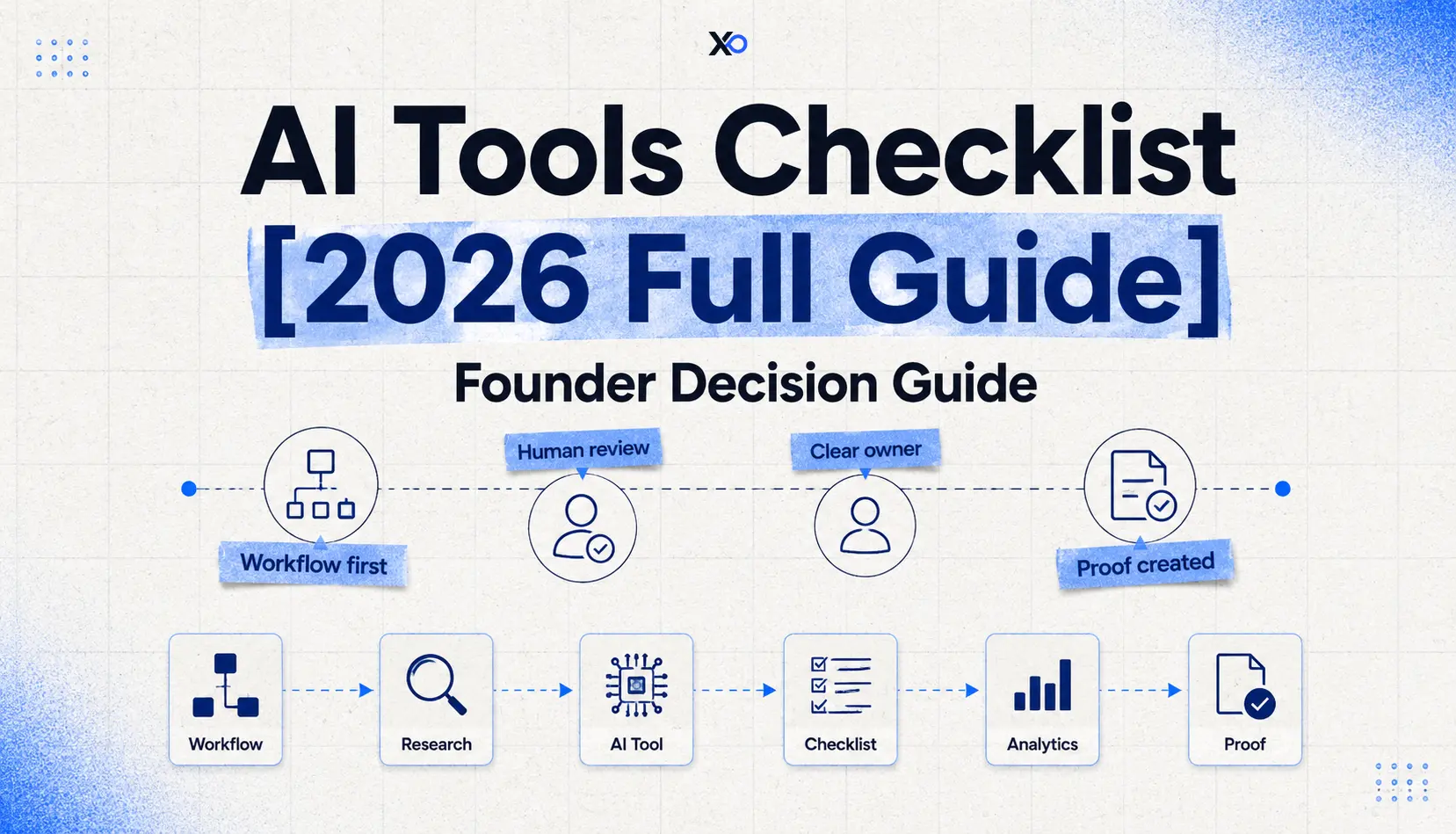
The Workflow -> Friction -> Owner -> Proof Filter
Use the Workflow -> Friction -> Owner -> Proof filter before adding any AI tool.
Workflow means the job must already exist. Founder research, code review, support triage, sales call notes, content drafts, product specs, QA checks, financial cleanup, and customer feedback synthesis are real workflows. “We should use more AI” is not a workflow.
Friction means the current process has a visible cost. A founder might spend three hours turning call notes into CRM updates. An engineer might lose time writing test scaffolds. Customer questions may repeat because nobody has a clean support memory. AI tools for startups are most useful when they remove this kind of repeatable drag.
Owner means one person is responsible for setup, prompts, permissions, review, source-of-truth hygiene, and renewal. Without an owner, the tool becomes shared clutter.

Startup Perks AI Assistant
Have questions about credits? Let's chat instantly.
Proof means the team knows what should improve. The proof can be simple:
- Sales notes are logged within 24 hours.
- Support themes are reviewed every Friday.
- Product specs reach engineering with fewer missing assumptions.
- Code review starts from a clearer first draft.
- Customer research is summarized into decisions, not just transcripts.
This filter protects founders from buying AI tools that feel productive but do not change the work that matters.
The missing word in most AI tool decisions is “proof.” Founders often ask whether the tool is powerful, whether competitors use it, or whether the interface feels easy. Those are secondary questions. The primary question is whether the tool can produce proof that the workflow improved.
Proof does not need to be complicated. A pre-seed founder might look for a faster customer interview synthesis process. A seed-stage operator might look for cleaner CRM hygiene after sales calls. A technical team might look for shorter cycle time between spec and pull request. A support owner might look for fewer repeated questions reaching the founder. Each proof target should be small enough to inspect and important enough to matter.
If a tool cannot be tied to a proof target, keep it in personal experimentation. Do not let it become part of the shared startup tool stack yet.
How to Evaluate AI Tools for Startups Before Adoption
The best AI tool evaluation is practical, not philosophical. Founders should compare tools by the operational weight they add relative to the work they remove.
Use seven criteria.
First, workflow fit. The tool should map to a real job in the company. If the job is not repeated, painful, or strategically important, use a manual process first. For teams testing an AI app-building workflow, the AI app-building option on XRaise can be evaluated against the same proof and reversibility criteria.
Second, time saved. Do not count time saved at the draft stage only. Count review, cleanup, correction, formatting, context switching, and rework. A tool that saves 20 minutes writing but creates 30 minutes of verification is not helping.
Third, adoption. A tool only works if the team changes behavior. If the output lives outside the systems people already use, adoption will decay after the first week.
Fourth, integration quality. Useful startup AI tools should write back into the existing stack, such as docs, issue trackers, CRM, support tools, analytics, or product management systems. Copy-paste workflows are acceptable for experiments, but risky as a permanent operating model.
Fifth, security and data handling. Founders should understand what data enters the tool, whether sensitive customer or company information is involved, how permissions work, and whether output can affect customers, code, finance, legal, or hiring decisions. AI security checklist thinking matters even for small teams because early habits harden quickly.
Sixth, cost behavior. AI tools can look cheap at low volume and become expensive when seats, usage, automations, model calls, transcripts, storage, or premium features scale. The question is not “Can we afford the first month?” It is “What happens if this becomes part of the weekly operating system?”
Seventh, reversibility. If the startup cancels the tool, can it export its data, retain context, and keep the workflow running elsewhere? A tool that traps customer notes, prompts, automations, or team memory deserves more caution.
Founders can explore startup software opportunities through XRaise after a simple scoring pass. Score real workflow fit, time saved, adoption, integration, security, cost, and reversibility. A tool does not need a perfect score to be worth testing, but it should not fail the area that makes the workflow important.
This is the difference between AI tool evaluation and AI tool enthusiasm. Evaluation asks what changes in the operating system after the tool is added. Enthusiasm asks whether the tool seems impressive in isolation.
Where AI Copilots, Agents, and Automation Actually Help
AI copilots for startups work best when the human still owns judgment. They are strong at drafting, summarizing, classifying, extracting, testing, suggesting, and routing. They are risky when they silently decide, publish, approve, charge, message, delete, or change customer-facing systems without review.
Think by workflow category:
| Startup job | Useful AI role | First useful output | Avoid when |
|---|---|---|---|
| Founder research | Synthesize notes, compare options, find patterns | Decision memo from interviews or market notes | You need source verification and nobody checks it |
| Product and engineering | Draft specs, generate tests, explain code, speed review | Pull request or spec with human approval | The team cannot review technical output |
| Sales | Summarize calls, update CRM, draft follow-ups | Cleaner account memory | ICP and qualification are still guesses |
| Support | Cluster tickets, draft replies, surface repeated issues | Weekly support themes | Replies go to customers without review |
| Marketing | Draft variants, repurpose content, compare messaging | Testable messaging options | The brand voice or claims are not reviewed |
| Operations | Route tasks, clean data, trigger repeat workflows | Fewer manual handoffs | The process is unstable or full of exceptions |
| Analytics | Explain dashboards, detect anomalies, summarize cohorts | Decision-ready metric notes | The team has not defined the decision behind the metric |
The strongest AI workflow automation usually starts after a manual workflow becomes boringly repeatable. If the process changes every week, automate the checklist, not the whole workflow.
There is also a difference between copilots, agents, and automation apps. A copilot usually helps a person complete work faster while the person stays in the loop. An agent may pursue a goal across steps, tools, or systems. An automation app connects triggers and actions between systems. For early teams, this distinction matters less than the review path, but it still changes risk.
Copilots work best when judgment stays close to the work. Automation fits stable processes where the team already understands the exceptions. Agents should come later, once the team can define the goal, limit the action space, monitor behavior, and recover from mistakes.
The more a tool can act without a human, the more founders need to care about logs, permissions, rollback, and ownership.
The Noise Traps That Make a Startup AI Tool Stack Harder to Run
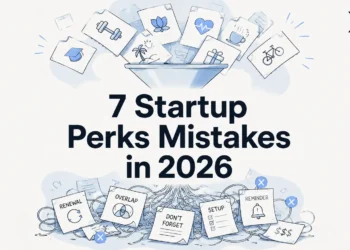
The first trap is overlapping assistants. One tool summarizes meetings, another summarizes calls, another summarizes support threads, and another summarizes research. Soon the team has summaries everywhere and decisions nowhere.
The second trap is review debt. AI output feels fast until the founder has to verify claims, fix tone, inspect code, correct customer context, and reconcile conflicting notes across tools.
The third trap is source-of-truth drift. If the AI tool creates a second place for specs, customer records, tasks, or analytics notes, the team now has to decide which system is real.
The fourth trap is automation before ownership. No AI adoption checklist works if nobody owns prompt quality, exception handling, permissions, billing, or cleanup.
The fifth trap is letting free trials define the stack. Founders reviewing startup perks in 2026 are vulnerable to this because a low-cost trial feels harmless. But every tool asks for attention. Every tool adds permissions. Every tool creates renewal and exit work.
The sixth trap is confusing output volume with progress. More drafts, more summaries, more tickets, more workflows, and more ideas do not matter unless they improve decisions, shipping, sales, support, or learning.
This is why the AI tools checklist should remove options as often as it approves them.
What to Use at Pre-Seed, Seed, and AI-Native Stages
Stage changes the right answer. A seed-stage SaaS team needs a different AI tool stack than a pre-seed team still validating the problem; use the Startup Eligibility Guide when programs, credits, or software opportunities depend on stage.
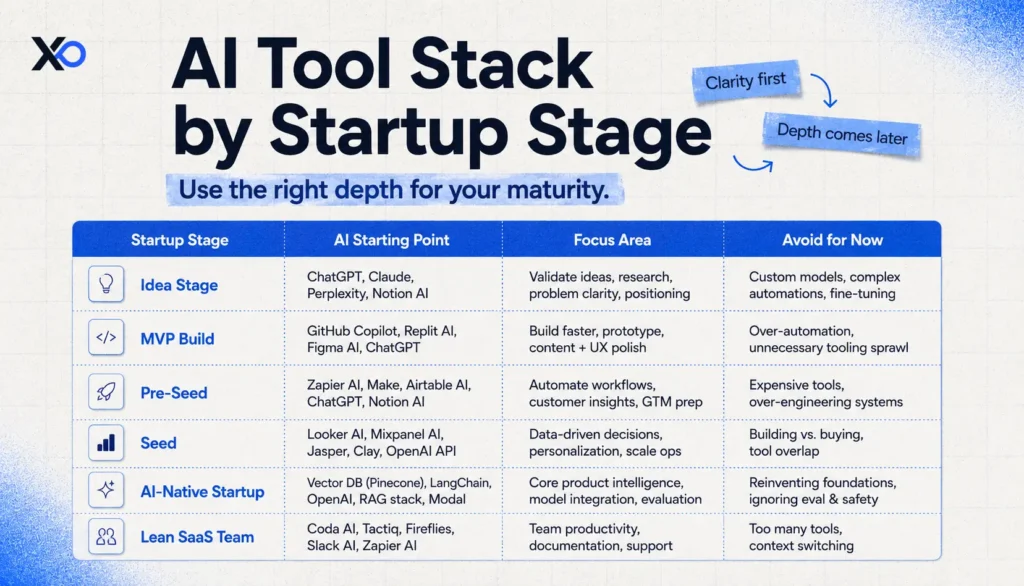
Seed-stage AI tools should usually make existing systems stronger. They should not force the team to rebuild its operating model around a shiny sidecar.
Non-technical founding teams should be especially careful with tools that promise technical shortcuts without review discipline. Technical teams have the opposite risk: they may adopt too many tools because each one seems manageable. The constraint is operating focus. If a tool does not improve the next milestone, it can wait.
The 30-Day AI Adoption Checklist
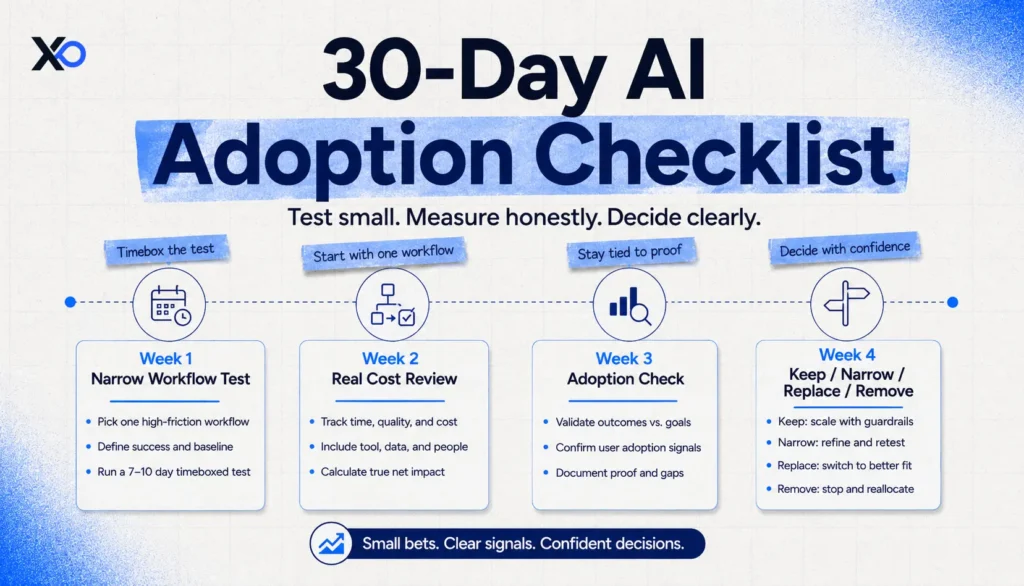
Before adopting the tool, write down the job, owner, data involved, expected output, review path, cost model, and exit plan.
During week one, test the tool on a narrow workflow. Do not roll it across the company. Pick one repeated job and compare the old process with the AI-assisted process.
During week two, measure the real cost of use. Include setup, prompt tuning, corrections, review time, integration work, and team confusion. If the tool only looks good when those costs are ignored, it is not ready.
During week three, check adoption. Is the team using it without founder reminders? Is the output landing in the right place? Are people making better decisions, or just producing more intermediate work?
During week four, decide whether to keep, narrow, replace, or remove it.
Use this operating cadence:
- Keep it if the workflow is faster, clearer, safer, and owned.
- Narrow it if one use case works but the broader rollout creates noise.
- Replace it if another existing tool can do the job with less context switching.
- Remove it if the output is not trusted or the owner is unclear.
This turns AI adoption from experimentation theater into a simple operating review.
The 30-day review should end with a written decision, even if the note is short. Capture the workflow tested, the owner, the measured improvement, the unresolved risks, the monthly or usage-based cost, and the next review date. This prevents tools from lingering because nobody wants to revisit the decision.
When to Wait, Test, or Invest
Use a simple AI tool filter before adding anything to the stack.
A workflow that is not clear should wait. Rare tasks can usually stay manual or run through a general-purpose tool. When a tool duplicates something already in the startup stack, decide what it replaces before adding it.
Any output that affects customers, code, finance, legal, hiring, or security needs human review. A tool that saves time but creates a second source of truth should only be tested with a narrow owner.
The strongest fit is a workflow the team already trusts, where the AI layer removes repeatable friction. Before rollout, set limits if usage-based cost could scale faster than revenue or learning.
When a tool helps the company make better decisions every week, it probably deserves a real trial.
The founder rule is simple: an AI tool should earn its place by reducing friction in a named workflow. If it only adds another tab, another assistant, another summary, or another dashboard, it is noise wearing a productivity costume.
Final Takeaway
An AI tools checklist does not make founders slower. It keeps speed honest.
The goal is not to reject AI tools. The goal is to avoid building an AI stack that looks modern but makes the company harder to operate. Choose the tools that remove real workflow friction, have a clear owner, integrate with the systems your team already trusts, and create proof that the startup is moving faster without losing clarity.